I'm starting to realize more and more that, however convoluted it may be, there is always a method to get my program to do what I want it to. Sometimes the method is messy. Most times, I just assume it's messy and skim over the really easy answer for a few hours.
So far I've completed compartmentalizing the input panel (and successfully). Now I'm working on the editing panel, which consists simply of a fill button, an add button, an identifier of the current value, a subtract button, and an empty button. Repeated 11 times, once for each character in the Matcode, of course. I've gotten the edit line finalized (just did that now), so that I can simply repeat that 11 times. I still need to code it to accept those 11 values, in order, as a Matcode and make the appropriate graphic. Also, as this is a tool mostly for myself as the eventual administrator of the simulation, I'll have a points system set up so that every time I add or subtract a value I see where I stand versus the average number of points I'd like for a material to have. Just as a guideline.
The final product will link the current code in the text input to the code being manipulated with the +/- buttons in order to make a more intuitive interface.
The work I've been doing the past couple of days has been frustrating. It took a long time to make something that still isn't actually very useful. Still, not all was lost. I finally understand how to make a subclass constructor actually do what I want it to. I had been programming a stupid little setup where the constructor simply set instance variables, then constructed a version of the superclass. It then returned this superclass in a separate method, making the class I defined essentially useless except as an instance variable holder. Turns out, and I've finally stumbled across this factoid, that the first line of a constructor's code is supposed to be a call to the constructor being used. Worse yet, all the times I didn't place this call, the program calls it anyway and I simply don't make use of it.
Ah, well, live and learn. Have to go back and edit a couple of constructors, but for the most part that won't take much at all. Time for bed, now. I'll be back tomorrow.
Sunday, 7 March 2010


Saturday, 6 March 2010
Efficient Algorithms and Abstract Data Types
These are the things I've learned the most about today. I've read through roughly a quarter of my new book so far and I'm liking what it's teaching me. It started with algorithms.
Algorithms are basically just set methods to achieve some sort of goal. A majorly important aspect of them is that they're broken down into pieces, and set up in such a way that a machine (computer, mechanical, or whatever) can perform them step-by-step. You increase an algorithm's efficiency by reducing the number of "characteristic operations" done to complete the task.
Consider, as a metaphor, rabbits. You start off with two rabbits. Each set of two rabbits produces two offspring, and so on and so on. (Note: this is, indeed, a vague shroud covering the exponential equations used as a model in the book, and would be plagiarism if I didn't acknowledge the fact). Presuming we're not considering bunny lifespans in our scenario, the number of rabbits around at generation 1 is 2, at 2 it's 4, at 3 it's 8, 4 it's 16, and so on where n = 2^n rabbits. If you're in generation 1, it only takes n = 2 to calculate the answer. At generation 2, n = 2*2 for anything to determine the proper value, which is one characteristic operation (multiplication is done one time). At three it's n = 2*2*2 (two characteristic operations), and so on to infinity.
In other words, it takes (n-1) characteristic calculations to determine the number of bunnies we've got running around our backyard.
Instead, you can consider the fact that for n = 1, it's simply 1*2 bunnies. For n = 2, it's 2*2 bunnies. For n = 3, it's (2*2)*2. This looks sloppy. Instead take n to be 100. For the first case, it takes 99 multiplications to get the proper answer. For the second, however, n = (2^50) * (2^50), which can also be broken down to simplify. When programmed properly (the value of 2^25 gets stored in a variable, then multiplied by itself to get the value of 2^50 which is stored into that variable, for example), this then only takes 6 iterations to calculate the number of bunnies at generation 100. And yes, it's possible to arrange this to apply to any value of n. And for any base (not just 2), for that matter.
It's really an amazing improvement, and in terms of code (the examples are provided in the book, I won't copy them here) you're looking at 1, maybe 2 extra lines to achieve that speed increase. Eventually I'll look over the equations I used for the MATLAB ISA Calculator assignment and try to figure out a quicker algorithm for that work. I'm sure something exists.
So, what are Abstract Data Types then? These are simply user-defined (where user- means programmer-) classes that serve to provide a structure and appropriate manipulation tools for the data stored within them. Technically pretty much every type of data in Java (or most any programming language) is an ADT, though most are defined by the language. Generally an ADT fulfills a specific role known as a contract, which states explicitly what the inputs to the class will be, what kinds of manipulation and output one can expect to get from the class, and what data must be stored within it. It's then the programmer's role to decide how to accomplish those goals most efficiently, without methods that are uncalled for (unless they serve to ease the processes that are required). I've been aware of the basic concept for a long time now, but the specifics of planning the type and implementing it as code is becoming more and more clear as time progresses.
I expect a lot of progress this weekend, as well as documentation of that progress.Wish me luck!
Algorithms are basically just set methods to achieve some sort of goal. A majorly important aspect of them is that they're broken down into pieces, and set up in such a way that a machine (computer, mechanical, or whatever) can perform them step-by-step. You increase an algorithm's efficiency by reducing the number of "characteristic operations" done to complete the task.
Consider, as a metaphor, rabbits. You start off with two rabbits. Each set of two rabbits produces two offspring, and so on and so on. (Note: this is, indeed, a vague shroud covering the exponential equations used as a model in the book, and would be plagiarism if I didn't acknowledge the fact). Presuming we're not considering bunny lifespans in our scenario, the number of rabbits around at generation 1 is 2, at 2 it's 4, at 3 it's 8, 4 it's 16, and so on where n = 2^n rabbits. If you're in generation 1, it only takes n = 2 to calculate the answer. At generation 2, n = 2*2 for anything to determine the proper value, which is one characteristic operation (multiplication is done one time). At three it's n = 2*2*2 (two characteristic operations), and so on to infinity.
In other words, it takes (n-1) characteristic calculations to determine the number of bunnies we've got running around our backyard.
Instead, you can consider the fact that for n = 1, it's simply 1*2 bunnies. For n = 2, it's 2*2 bunnies. For n = 3, it's (2*2)*2. This looks sloppy. Instead take n to be 100. For the first case, it takes 99 multiplications to get the proper answer. For the second, however, n = (2^50) * (2^50), which can also be broken down to simplify. When programmed properly (the value of 2^25 gets stored in a variable, then multiplied by itself to get the value of 2^50 which is stored into that variable, for example), this then only takes 6 iterations to calculate the number of bunnies at generation 100. And yes, it's possible to arrange this to apply to any value of n. And for any base (not just 2), for that matter.
It's really an amazing improvement, and in terms of code (the examples are provided in the book, I won't copy them here) you're looking at 1, maybe 2 extra lines to achieve that speed increase. Eventually I'll look over the equations I used for the MATLAB ISA Calculator assignment and try to figure out a quicker algorithm for that work. I'm sure something exists.
So, what are Abstract Data Types then? These are simply user-defined (where user- means programmer-) classes that serve to provide a structure and appropriate manipulation tools for the data stored within them. Technically pretty much every type of data in Java (or most any programming language) is an ADT, though most are defined by the language. Generally an ADT fulfills a specific role known as a contract, which states explicitly what the inputs to the class will be, what kinds of manipulation and output one can expect to get from the class, and what data must be stored within it. It's then the programmer's role to decide how to accomplish those goals most efficiently, without methods that are uncalled for (unless they serve to ease the processes that are required). I've been aware of the basic concept for a long time now, but the specifics of planning the type and implementing it as code is becoming more and more clear as time progresses.
I expect a lot of progress this weekend, as well as documentation of that progress.Wish me luck!
Thursday, 4 March 2010
Computer Issues, More Code, and Toast
My girlfriend's laptop is on the fritz. I think there's a virus on it given how it's acting, though I admit she's usually more cautious about them than I am. That said, I spent a while working on it today and it left me with limited time.
Still, I finished the builder pattern. It works perfectly for the text box I used before, and I imagine it won't have any problems with any other text boxes I make. In the end I had a nasty if/else structure in the processing of the input text, but I spent a long time trying to come up with a better way and couldn't find one. That said I did reduce the redundancy of it by creating method calls to do any repetetive tasks, so while the structure is a bit messy it isn't very wordy.
Tomorrow will see the finalization of the interpreter with the last internalization of the input panels. Aside from that, I got a new book to read from the library. This one is actually one that I'll probably read cover-to-cover rather than as a reference book to pick and choose sections from. It's called "Java Collections: An Introduction to Abstract Data Types, Data Structures, and Algorithms" by David A. Wyatt and Deryck F. Brown. I'm hoping to find the best way of making my JDO classes by reading through it.
In all, a nice and short post, expect more tomorrow.
Still, I finished the builder pattern. It works perfectly for the text box I used before, and I imagine it won't have any problems with any other text boxes I make. In the end I had a nasty if/else structure in the processing of the input text, but I spent a long time trying to come up with a better way and couldn't find one. That said I did reduce the redundancy of it by creating method calls to do any repetetive tasks, so while the structure is a bit messy it isn't very wordy.
Tomorrow will see the finalization of the interpreter with the last internalization of the input panels. Aside from that, I got a new book to read from the library. This one is actually one that I'll probably read cover-to-cover rather than as a reference book to pick and choose sections from. It's called "Java Collections: An Introduction to Abstract Data Types, Data Structures, and Algorithms" by David A. Wyatt and Deryck F. Brown. I'm hoping to find the best way of making my JDO classes by reading through it.
In all, a nice and short post, expect more tomorrow.
Wednesday, 3 March 2010
"Bob" the Builder (pattern)
So, I've heard of Java constructors. These friendly little guys make an instance of an object when the program calls them, setting variables if necessary, making everything work the way you need to. Today, however, was the first time I'd heard of Builders.
Constructors can, sometimes, get really messy. "Setting variables if necessary" can get to the point where you have 20 variables to set and 18 of those are optional. It's nasty to program a constructor to properly handle optional variables and it's nasty to call a constructor with all of those variables. And who wants to print out a list of which variable comes when in the call to the constructor?
Hello, builders. Builders are like flexible constructors, but they require a bit more manipulation to set up properly. Basically a builder is a class placed inside the class you want to construct, and no constructor is made available for that class. Instead, you call the constructor for the builder (in Java syntax this means you call something like endgoal.builder() where endgoal is the thing being built), with any required values included in the () after builder. Then you continue calling optional values by adding .option1(), .option2(), and so on until the object is fully set up for you. All of the values that eventually go into your endgoal object are stored privately inside the builder class so as not to cause any funny business on the part of your outer class.
When you're all done, you call the endgoal.build() class to put it all together for you, as necessary.
What am I using this for? At the moment, validation on the text box used to enter Material Codes. Matcodes must be 11 characters long, consisting only of english alphabet letters. I convert the input to uppercase inside the material code interpreter's method, so it's not a big deal what case you use externally, but internally it does make a difference.
I realize that the matcode input is not the only text field I'm going to use, and in searching for the way to limit the maximum number of characters in a text field I've come to the conclusion that it requires making a so-called "Document" that tells the input box how to behave. This is easy enough, but why code a separate document for each text input when I can just create a builder?
For now I'm coding in the options to change the input to Upper/Lowercase depending on needs, to force the input to be alphabetical, numerical, or both, to set a maximum length onto the input, and finally to allow or disallow spaces in the input. In the case of my matcode text box, I'll call something like:
It looks a little nasty but for my sanity it's better than something more like:
where I have to remember which position responds to which value every time I make a new input box. And that would be even longer if I come up with more options to throw in here. Don't forget that if all I want to do is disallow spaces, with the builder I can just do LimitBuilder().forceNoSpace().build() whereas with the other one I have to include all of the "false" values until the very end. And Java forbid I forget how many false values that adds up to.
The JTextFieldLimits class isn't quite finished yet, but it's progressing smoothly and I don't think I'll run into too many problems with it. Once that's done I'll get back to work on isolating the MatPolygonDraw class by having it build its own panels. I think I'll have both of those done before my next post.
Reference: http://rwhansen.blogspot.com/2007/07/theres-builder-pattern-that-joshua.html Thanks for the help!
Constructors can, sometimes, get really messy. "Setting variables if necessary" can get to the point where you have 20 variables to set and 18 of those are optional. It's nasty to program a constructor to properly handle optional variables and it's nasty to call a constructor with all of those variables. And who wants to print out a list of which variable comes when in the call to the constructor?
Hello, builders. Builders are like flexible constructors, but they require a bit more manipulation to set up properly. Basically a builder is a class placed inside the class you want to construct, and no constructor is made available for that class. Instead, you call the constructor for the builder (in Java syntax this means you call something like endgoal.builder() where endgoal is the thing being built), with any required values included in the () after builder. Then you continue calling optional values by adding .option1(), .option2(), and so on until the object is fully set up for you. All of the values that eventually go into your endgoal object are stored privately inside the builder class so as not to cause any funny business on the part of your outer class.
When you're all done, you call the endgoal.build() class to put it all together for you, as necessary.
What am I using this for? At the moment, validation on the text box used to enter Material Codes. Matcodes must be 11 characters long, consisting only of english alphabet letters. I convert the input to uppercase inside the material code interpreter's method, so it's not a big deal what case you use externally, but internally it does make a difference.
I realize that the matcode input is not the only text field I'm going to use, and in searching for the way to limit the maximum number of characters in a text field I've come to the conclusion that it requires making a so-called "Document" that tells the input box how to behave. This is easy enough, but why code a separate document for each text input when I can just create a builder?
For now I'm coding in the options to change the input to Upper/Lowercase depending on needs, to force the input to be alphabetical, numerical, or both, to set a maximum length onto the input, and finally to allow or disallow spaces in the input. In the case of my matcode text box, I'll call something like:
input.setDocument( new JTextFieldLimits.LimitBuilder()
.charLimit(11).toUpperCase().forceLetter()
.forceNoSpace().build() );
It looks a little nasty but for my sanity it's better than something more like:
input.setDocument( new JTextFieldLimits(true, 11,
true, false, true, false, false, true));
where I have to remember which position responds to which value every time I make a new input box. And that would be even longer if I come up with more options to throw in here. Don't forget that if all I want to do is disallow spaces, with the builder I can just do LimitBuilder().forceNoSpace().build() whereas with the other one I have to include all of the "false" values until the very end. And Java forbid I forget how many false values that adds up to.
The JTextFieldLimits class isn't quite finished yet, but it's progressing smoothly and I don't think I'll run into too many problems with it. Once that's done I'll get back to work on isolating the MatPolygonDraw class by having it build its own panels. I think I'll have both of those done before my next post.
Reference: http://rwhansen.blogspot.com/2007/07/theres-builder-pattern-that-joshua.html Thanks for the help!
MatPolygonDraw: LF More Responsibility, Better Name.
So, naming scheme aside, my "MatPolygonDraw" function is quite a capable function. It defines the vector of colors used to determine the fill color of the polygon in question, it draws the labels for each point, the bounds of the full shape, and the lines connecting each point to the maximum value for that point. In achieving these goals, it takes an input string, checks it for validity, determines its numerical value, converts the numerical value combined with its string position to work out the variable the value applies to and then determine X,Y coordinates of where that point is.
I'm sure it does more, but, meh, I'm still working on it so there's no need to keep explaining it. I updated it today to contain a nested class entitled matButton, a subclass of the JButton. Now, rather than creating a new JButton and assigning it an actionListener to make everything work as it should, the frame that hosts the MatPolygonDraw instance simply calls the getButton class, passes any pertinent information over, and receives a new JButton appropriately configured for the task.
Tomorrow will see the expansion of this concept. Rather than just the the JButton, I'll include the JTextField component and place both of them on a panel. This way I'll just call getInputPane or whatever I decide to name it and I'll receive both of these, properly configured. I'll do the same to create a getEditPane for manipulating the material's properties, and any other panes I may need to accomplish any task I can imagine that requires a material graphic interpretation.
Then I just make the structure for any other objects that need manipulation, I go ahead and follow the same process for getting the necessary interfaces, and voila, simple finished product.
In other words, I think I'm getting this, because suddenly I'm realizing just how little work I'll have to put into the final assembly of everything compared to the creation of the manipulating classes.
In all, I'm content. It's time for bed though, and that leaves this post open for discussion. Any recommendations for a better name for this class? Preferably something that defines what it does, very concisely. Best name gets immortalized in my code! And... a cyber cookie?
P.S: I'm going to stop going ridiculously overboard on the tags for my posts. They're all about computing, no need to continue labelling that.
I'm sure it does more, but, meh, I'm still working on it so there's no need to keep explaining it. I updated it today to contain a nested class entitled matButton, a subclass of the JButton. Now, rather than creating a new JButton and assigning it an actionListener to make everything work as it should, the frame that hosts the MatPolygonDraw instance simply calls the getButton class, passes any pertinent information over, and receives a new JButton appropriately configured for the task.
Tomorrow will see the expansion of this concept. Rather than just the the JButton, I'll include the JTextField component and place both of them on a panel. This way I'll just call getInputPane or whatever I decide to name it and I'll receive both of these, properly configured. I'll do the same to create a getEditPane for manipulating the material's properties, and any other panes I may need to accomplish any task I can imagine that requires a material graphic interpretation.
Then I just make the structure for any other objects that need manipulation, I go ahead and follow the same process for getting the necessary interfaces, and voila, simple finished product.
In other words, I think I'm getting this, because suddenly I'm realizing just how little work I'll have to put into the final assembly of everything compared to the creation of the manipulating classes.
In all, I'm content. It's time for bed though, and that leaves this post open for discussion. Any recommendations for a better name for this class? Preferably something that defines what it does, very concisely. Best name gets immortalized in my code! And... a cyber cookie?
P.S: I'm going to stop going ridiculously overboard on the tags for my posts. They're all about computing, no need to continue labelling that.
Tuesday, 2 March 2010
Compartmentalization, Encapsulation, and Isolation, oh my!
I've been focusing a lot on these inheritance features today. I know, for instance, that I can create a class Planet, and that I can also create a class Moon extends Planet, so that the two are differentiated in name but don't need repetitive coding. I've been considering the pros and cons of making all of the attributes I've taken to calling low-level attributes (a planet's name, for exmaple... the things that the object stores that don't reference other objects) implement a custom interface.
Time for some explaining? I think so. In Java, a class (known as a child or a subclass) can extend another class (known as a parent or a superclass). This means that, unless an underlying method in the child overrides the parent's method (this is done simply by creating a method in the child with the same name as the parent's method), the methods defined in the parent are equally as applicable to the child. In the case of class Planet and class Moon extends Planet, as above, the method getSize() would return a number representing the planet's diameter, and would do the same for a Moon even without explicitly rewriting the code.
Now on to implementing interfaces. An interface is an abstract class, which means that it cannot be used directly. Instead, when a class implements an interface, everything written into that interface MUST be overridden by the new class. If I have attributes, to use the example above, which all have different variables within them (say, a description attribute holds text describing the object, an armor attribute holds a value representing the armor's strength), I can create an interface that defines getType() and getValue() as methods that MUST be overridden, therefore making the attributes universal in structure.
A Java class can extend only one parent lass, but can be extended by infinitely many children. A Java class can implement as many interfaces as it wishes, so long as all of the underlying methods are overridden. Because of the way these two aspects of "inheritance" work, they are known as two related but separate pathways of defining a new class. By making a new class a child of a parent class, you are inheriting behavior. That is to say, all of the 'hows' in the class are defined by the parent class, except for the occasional overriding method or additional method. By having a new class implement an interface, you are inheriting structure, because the layout of the new class must match the interface, but the specific algorithms used are specific to the new class.
There's my brief lecture on Java's inheritance. That out of the way, I haven't done coding work today, seeing as I instead attended a showing of "Willy Wonka and the Chocolate Factory" (that's right, the original) at the University. I did get a lot of (additional) thinking in and I realized one of the shortcomings in the current embodiment of the interpreter I showed yesterday. I have a button that is specialized for the window I showed you, not one I can place into just any window I place the graphic into. This also means that when I go to make a more capable "administrator" version that allows me to generate material codes on-the-fly, I'll have to completely reprogram that button.
Instead I can use some nifty features of Java's by including a specialized button subclass into the class that creates the material graphic. This subclass would be inherently tied to the material graphic that the button updates, and wouldn't require any coding except placement in the larger window.
Overall this would greatly increase the capabilities of the materials panel I've made, as well as the capabilities of any future classes I make. I consider this Compartmentalization (and I think the textbooks agree with me) because it means that any frame that uses the MatCodeInterpreter will, without extra work, be able to add the necessary buttons and fields to manipulate it.
I think tomorrow will see me working on making that a reality.
Monday, 1 March 2010
Mission Accomplished!
For the first time in my blogging career of nearly two weeks, I have something to show you that I've been promising in relation to my Simulation. That's right, I have finished my material decoder. Well, at least functionally, certainly it needs work to be implemented.

That, my reader(s), is my new MatCode Interpreter in action. Type in 11 characters, hit evaluate, and a new shape will be made for you. I admit, it has limited practical use as it doesn't supply exact values (it could, just doesn't), but it gives a good representation of approximate values. The color of the figure shows an interpretation of the material's "Workability Factor," a fancy name for cost modifier. The interpretation is that the darker/redder the color, the more expensive it is to work with. This random material apparently is very cheap to work with. The ten named values are (clockwise from right (3 o'clock)) integrity, conductivity, combustibility, heat resistance [index], transparency, elasticity, magnetism, nuclear value [index], decay resistance [index], and [intrinsic] value. Bear in mind that mid-range values are assumed to be average. In other words, the only places this material is above-average are magnetism, elasticity, heat resistance, and perhaps combustibility.
Above average isn't always better, though.
Anyway, this is my first actually vaguely complex Java program, and my first go with Java graphics aside from JFrames (basically, windows and buttons). I had made the text layout in photoshop, but I decided instead to render it using Java's graphics, in part to better acquaint myself with the system and in part because for a long time I was having trouble figuring out how to get the image into the program. I've since figured it out, but that was after setting Java up to do it.
So... what's my next step? I have no freaking clue. But I have plenty of other classes to work on. Some should be pretty easy, just the structural classes for my JDO database. Others are more involved, making frames and panels for managing different pieces. I have a lot of work to go, but I've made the first sizeable step.
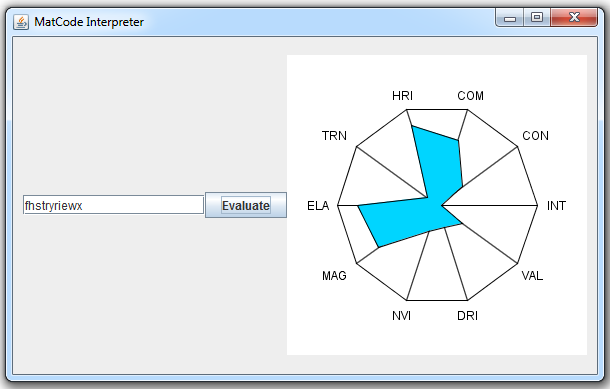
That, my reader(s), is my new MatCode Interpreter in action. Type in 11 characters, hit evaluate, and a new shape will be made for you. I admit, it has limited practical use as it doesn't supply exact values (it could, just doesn't), but it gives a good representation of approximate values. The color of the figure shows an interpretation of the material's "Workability Factor," a fancy name for cost modifier. The interpretation is that the darker/redder the color, the more expensive it is to work with. This random material apparently is very cheap to work with. The ten named values are (clockwise from right (3 o'clock)) integrity, conductivity, combustibility, heat resistance [index], transparency, elasticity, magnetism, nuclear value [index], decay resistance [index], and [intrinsic] value. Bear in mind that mid-range values are assumed to be average. In other words, the only places this material is above-average are magnetism, elasticity, heat resistance, and perhaps combustibility.
Above average isn't always better, though.
Anyway, this is my first actually vaguely complex Java program, and my first go with Java graphics aside from JFrames (basically, windows and buttons). I had made the text layout in photoshop, but I decided instead to render it using Java's graphics, in part to better acquaint myself with the system and in part because for a long time I was having trouble figuring out how to get the image into the program. I've since figured it out, but that was after setting Java up to do it.
So... what's my next step? I have no freaking clue. But I have plenty of other classes to work on. Some should be pretty easy, just the structural classes for my JDO database. Others are more involved, making frames and panels for managing different pieces. I have a lot of work to go, but I've made the first sizeable step.
Subscribe to:
Posts (Atom)