Showing posts with label technology. Show all posts

Tuesday, 2 March 2010

Compartmentalization, Encapsulation, and Isolation, oh my!

I've been focusing a lot on these inheritance features today. I know, for instance, that I can create a class Planet, and that I can also create a class Moon extends Planet, so that the two are differentiated in name but don't need repetitive coding. I've been considering the pros and cons of making all of the attributes I've taken to calling low-level attributes (a planet's name, for exmaple... the things that the object stores that don't reference other objects) implement a custom interface.

Time for some explaining? I think so. In Java, a class (known as a child or a subclass) can extend another class (known as a parent or a superclass). This means that, unless an underlying method in the child overrides the parent's method (this is done simply by creating a method in the child with the same name as the parent's method), the methods defined in the parent are equally as applicable to the child. In the case of class Planet and class Moon extends Planet, as above, the method getSize() would return a number representing the planet's diameter, and would do the same for a Moon even without explicitly rewriting the code.

Now on to implementing interfaces. An interface is an abstract class, which means that it cannot be used directly. Instead, when a class implements an interface, everything written into that interface MUST be overridden by the new class. If I have attributes, to use the example above, which all have different variables within them (say, a description attribute holds text describing the object, an armor attribute holds a value representing the armor's strength), I can create an interface that defines getType() and getValue() as methods that MUST be overridden, therefore making the attributes universal in structure.

A Java class can extend only one parent lass, but can be extended by infinitely many children. A Java class can implement as many interfaces as it wishes, so long as all of the underlying methods are overridden. Because of the way these two aspects of "inheritance" work, they are known as two related but separate pathways of defining a new class. By making a new class a child of a parent class, you are inheriting behavior. That is to say, all of the 'hows' in the class are defined by the parent class, except for the occasional overriding method or additional method. By having a new class implement an interface, you are inheriting structure, because the layout of the new class must match the interface, but the specific algorithms used are specific to the new class.

There's my brief lecture on Java's inheritance. That out of the way, I haven't done coding work today, seeing as I instead attended a showing of "Willy Wonka and the Chocolate Factory" (that's right, the original) at the University. I did get a lot of (additional) thinking in and I realized one of the shortcomings in the current embodiment of the interpreter I showed yesterday. I have a button that is specialized for the window I showed you, not one I can place into just any window I place the graphic into. This also means that when I go to make a more capable "administrator" version that allows me to generate material codes on-the-fly, I'll have to completely reprogram that button.

Instead I can use some nifty features of Java's by including a specialized button subclass into the class that creates the material graphic. This subclass would be inherently tied to the material graphic that the button updates, and wouldn't require any coding except placement in the larger window.

Overall this would greatly increase the capabilities of the materials panel I've made, as well as the capabilities of any future classes I make. I consider this Compartmentalization (and I think the textbooks agree with me) because it means that any frame that uses the MatCodeInterpreter will, without extra work, be able to add the necessary buttons and fields to manipulate it.

I think tomorrow will see me working on making that a reality.

Monday, 1 March 2010

Mission Accomplished!

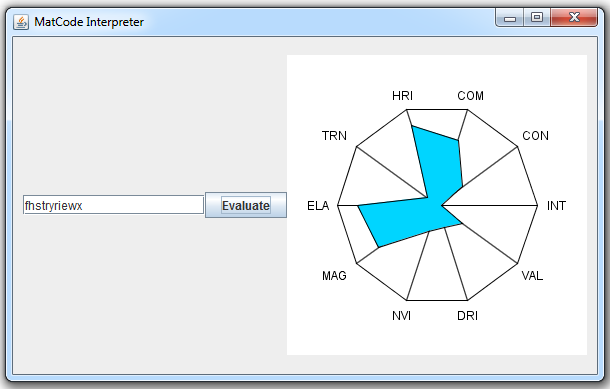
For the first time in my blogging career of nearly two weeks, I have something to show you that I've been promising in relation to my Simulation. That's right, I have finished my material decoder. Well, at least functionally, certainly it needs work to be implemented.


That, my reader(s), is my new MatCode Interpreter in action. Type in 11 characters, hit evaluate, and a new shape will be made for you. I admit, it has limited practical use as it doesn't supply exact values (it could, just doesn't), but it gives a good representation of approximate values. The color of the figure shows an interpretation of the material's "Workability Factor," a fancy name for cost modifier. The interpretation is that the darker/redder the color, the more expensive it is to work with. This random material apparently is very cheap to work with. The ten named values are (clockwise from right (3 o'clock)) integrity, conductivity, combustibility, heat resistance [index], transparency, elasticity, magnetism, nuclear value [index], decay resistance [index], and [intrinsic] value. Bear in mind that mid-range values are assumed to be average. In other words, the only places this material is above-average are magnetism, elasticity, heat resistance, and perhaps combustibility.

Above average isn't always better, though.

Anyway, this is my first actually vaguely complex Java program, and my first go with Java graphics aside from JFrames (basically, windows and buttons). I had made the text layout in photoshop, but I decided instead to render it using Java's graphics, in part to better acquaint myself with the system and in part because for a long time I was having trouble figuring out how to get the image into the program. I've since figured it out, but that was after setting Java up to do it.

So... what's my next step? I have no freaking clue. But I have plenty of other classes to work on. Some should be pretty easy, just the structural classes for my JDO database. Others are more involved, making frames and panels for managing different pieces. I have a lot of work to go, but I've made the first sizeable step.

Friday, 26 February 2010

Making a Series of Menus Look Fun (also: Planet Classes)

Let's face it. Number crunching, data entry, and stat reviews aren't all that entertaining. It doesn't matter if the game they're all for is freaking awesome, it gets boring. I've been thinking about a few ways of making the management of an empire more entertaining even during peacetime.

If I can integrate messages and "forums" into the GUI, it gives the user more incentive to use the program. Also, putting in a chat system, while questionably useful for a small number of users, could occasionally make some entertainment. I intend to play background music, probably without including any files of my own. In other words, the user can integrate his/her own music library.

These features are all long-term planning, probably tough to implement, but they'd be brilliant additions to the game. Less long-term is making the game appear more entertaining.

My current hope is to develop (or find) a series of potential planet textures, as well as moon textures, and show animations of these in the background. When you're looking over your planets, you'll see an approximation of your planet and its moons rotating around. I don't think this will be too hard to implement and at the very least I'll have a static image of the planet in view. I have a friend looking into making them for me, but he doesn't promise anything. I pretended to do some work on it, but I suck with computer graphics. Hopefully I'll find, or have created, a decent set.

That said, if you can't already guess, I got distracted, so the GUI is not in any sort of displayable state.

I can, however, introduce my planet classification system. Avoiding copying a system from Star Trek or similar, I decided to derive my own. So, I give you my system:

  1. M[oon] or P[lanet]
  2. H[ospitable], I[nhospitable], C[olonizable], E[ngineer]
  3. R[ocky] or G[aseous]
  4. D[esert], A[rctic], T[emperate], B[arren], F[orest], J[ungle], W[ater], V[olcanic]
  5. Size (3 digit number, in 1000s of Kilometers (Megameters?))
In other words, a newly discovered planet will probably have a name something like: PHRT-013 and it may have a moon named MCRB-004. Follow the letters into the list above and you'll realize it's a planet vaguely similar to Earth with a moon much the same. Only thing that really needs explanation is the difference between I, C, and E. I means there's no way to settle it at all. C Means you can settle it via domes or other artificial structures. E means domes will work, but you could get more effect out of it if you terraform (sometimes called Space Engineering).

It's not ridiculously inventive or complex but I think it gets the job done. And that's all for now, tomorrow we'll see some sort of actual code progress. I cross my heart.

Tuesday, 23 February 2010

The Platypus: Object-Oriented Programming Primer

So, about that material decoder. Maybe tomorrow? I didn't have time for much coding today, but I have done some reading. Platty Pat apparently has been given the name Phyl by the author, but I like Platty Pat better so I'm sticking with it.

So what is Object-Oriented programming, anyway? According to this book (I need to give credit where it's due, so the book in question is: "Understanding Object-Oriented Programming with Java" by Timothy Budd. ISBN: 0-321-21174-X for my particular version), it's all about creating code in sections, called objects, which are essentially independent. Each object has its own responsibilities and its own way of accomplishing the tasks set out for it. In principle, there should be only a couple of interconnections between objects, and objects should be reusable from project to project without major restructuring. The program should also be separated such that major feature changes (graphical updates or saving to a different format or what-have-you) should only take updating one or two of the objects, as the other objects don't rely on what's in the other things, but what comes out of them.

I've been reading a bit about the class-oriented nature of Java, which, as I've said in the past, is the biggest part of what the book is about, and the biggest thing about Java I feel I need to understand more clearly. It's the reason there's a platypus on the cover of the book, because if you extend the class structure to real life, the platypus 'extends' the 'class' mammal but 'overrides' some 'methods,' primarily birthing. Anyway, basically a convenient metaphor that sums up a lot of the features of class-oriented programming.

Right now they're going through the design process behind it all, and it certainly is a lot different than what I've done so far--a kind of disappointing fact considering most of the books I've studied have been based around Java, so it would have been nice if it had started with Object-Oriented facets of the language. That said, given my as-yet limited experience with programming, it shouldn't be hard to switch to their methodology, which definitely seems like it would help.

It's interesting stuff and it's something I'm definitely going to take into consideration. Especially on account of the conversation I had today with a friend about my plans for the Simulation. He feels it'd be better for both sides if the administrator was cut out, to save time and all. I'm still intent on allowing complete customization though, which can't be done without the administrator. If I properly program this, I should be able to pretty easily try both. So I guess that's one of my new goals for the project. Keep in mind that one of my favorite things about PC games, and the reason I prefer them to console games a lot of times, is the fact that they can be modified. Mods can extend the life of a game quite astonishingly, and the customization is a key selling point to me. That's probably why I'm so set on making the simulation with the administrator-figure.

Also I managed to stumble upon Google Code, a resource for developers. Apparently a ton of Google's stuff is available for use by independent coders like myself. I might have a go at it sometime, but for now it's conveniently filed away that if I ever have a project that could take advantage of it, it's there to be used.

Sunday, 21 February 2010

Kicking a Dead Horse

My ISA calculator is done. I've left out the US Standard Atmosphere calculations from it, simply because if I were to add it now I'd take the cheap way out of simply converting the input to metric, then the original outputs back into US units. This would be a little bit inefficient and a bit inaccurate, as the different standards are bound to use different conversions than I would. If I ever want to add in that function, then I'll do it proper.

That said, I did change most of the other things I found to be lacking:


  • Now takes advantage of normalized units, which means the window can be resized (relatively) without problems. Resizing it will allow the table to be viewed without a horizontal scrollbar, and in many situations without a vertical one either.
  • No longer recalculates if the values entered at the time of giving it the calculation command are the same as the last values used.
  • Fixed a small bug in which if the user clicked the same plot button they were already on, they'd receive a dialog stating "Unknown Plot Type Error." Turns out, the error was simply that none of the plots were selected. If that situation comes up now, it simply returns out of the statement, leaving the last-selected plot in view.
  • Pressing enter in a text input box now calculates as necessary.
MATLAB itself has some shortfalls which prevented proper fixes for the recalculation bug and the axis tick mark problem. The first problem is that it's not easy (I'd like to say not possible but that almost always is proven wrong) to have more than one "axes" object in the same GUI. I wanted, originally, to have one set of axes for each plot, and simply hide/show the different axes as requested. Unfortunately, as MATLAB denies me this option, every time the user selects a different plot type, MATLAB has to go through and re-position all of the data points on the set of axes. While it doesn't need to calculate all of the values again, the plotting itself definitely appears to take longer than the calculations, as there's no noticeable decrease in time between inserting fresh values and just switching the displayed plot with the same values.

The second problem was axis tickmarks. The problem here is that the tickmarks have to be manually declared as exact values. While it's not incredibly hard to calculate a vector of values rounded to the nearest thousand or something, the requirements are so contextual to make it a mostly useless bit of extra programming. What happens when the user only wants to see the range of heights from 0 to 25m? From 1276 to 8452 meters? From 0 to 100 meters, in 520 increments? I think you see my point. MATLAB's automatic tickmark decisions are vaguely useful enough to allow them to be the only ones.

So, that said, my work is done.You can find, look over, criticize, and hopefully provide feedback on the source code at this link. I'd expect to hear things along the lines of "it's horribly inefficient," "I'm amazed this works at all," and "YOU SUCK!" so feel free to be brutal, as long as there's some sort of suggestion for improvement alongside it.

Expect to hear progress on my Java simulation tomorrow! Probably a working, if preliminary, version of my material decoder at the least.

Project Introduction: Java Simulation Game

While I'm doing some fine-tuning on the MATLAB project before posting the code, I figure now's a good time to introduce the other main project I'm working on. This one's a bit more complex and will probably be in production for ages (an unfortunate side-effect to lack of deadlines).

The simulation game I know and love doesn't really have much in terms of graphics. It's much more a thought-based, economy/diplomacy/strategy simulation, with rules governing interactions, extraction and deployment of resources, and the like. If you have an imagination, it's a real fun game to play because literally anything is possible--you have an administrator or two running it and keeping it balanced, but otherwise if you can think it, it can be done. My version, and all the ones I've played, are sci-fi, galactic empire style games. You rule planets, not cities, basically.

In the versions of these games that I've played, the major downfalls were (discounting admin inactivity and small player base):


  • Problems with cheat-detection. All of these I've played so far were excel-based (or worse, simply forum-based), meaning if a player modified the excel file it becomes tough to notice it.
  • Reliance on other players. As all interaction requires a response from someone else, things went slow. For diplomacy and trade, this isn't a problem. But what happens when your fleet is at another player's planet, waiting for the other player to respond to continue the battle, and another enemy comes to your planet knowing you've got no defenses?
  • Lack of 'realism.' Mostly in the fact that the player controls EVERYTHING in the past games I've played, which makes playing tougher. Sure, it's nice having absolute say over everything, but it isn't necessary and adds a lot of work.
Therefore I've set out to create my own version of the simulation-style game:

  • Programmed in Java, with no access to source code, to prevent cheating but allow essentially any computer to run it.
  • More administrator decision-making. A player entering a battle will get to dictate what the general strategy is, what the main targets are, under what circumstances the forces are to retreat, large-scale strategic things like how much of the fleet actually enters the battle to begin with and what remains as mid-fight reinforcements. The defending player then gets told what he knows of the situation (the ships currently in the fray, essentially), and issues main targets and defense objectives. The generals do the micromanaging, and the end result is a battle decision created in a short time through the administrators.
  • The concept behind my game in practice is that the leader does leader things. The economy is essentially entirely controlled by the player, but research is done more true-to-life. If a player wants to develop a new fighter craft, they don't tell the admin what exactly goes into it and receive a yes/no answer as to whether it works. Instead, they put the offer out to companies, who create prototypes and bid on contracts, and it's up to the player to choose from a few different options given to them.
Now, some of you may be thinking "this really doesn't sound like fun." For many of you, that'd actually probably be true. This style of game is certainly not everyone's cup of tea. Do bear in mind it isn't simply number crunching. Every action has an outcome on the whole of the galaxy, based on other players' political responses and the NPCs. And a battle doesn't simply go: X ships vs Y ships, Y wins, no ships remaining for X, Y-n ships remaining for Y. It's the administrator's job to narrate, tell a story, and entertain.

Some other features I'll be including in the game concept are:

  • Realistic (pythagorean-theorem based) travel times via galactic map coordinates.
  • In-depth trading system. All planets will have some of a predetermined list of resources, and most will have their own unique (though questionably useful) resources. Probably will also include a materials market much like the stock market, based on quasi-realistic supply and demand.
  • Through the material system, potentially interesting design quirks, waiting to be discovered, in nearly everything. A leader may find a nasty surprise waiting for him when he suddenly discovers his troops are carrying extremely magnetic weaponry, and his enemy knew this before he did, disarming them by way of electromagnets (for a top-of-my-head example).
  • By definition, each race will have (aside from preset starting 'equipment') completely unique armies, infrastructures, and economies.
  • Dynamic game structure--because the game is coded by the eventual administrator, things can be changed. Want to play a socialist utopia? The economy for your race can be re-coded to be more befitting. For example.
  • Espionage that provides both real and incorrect data, and most often time-sensitive. You'll be more likely to find out an enemy fleet's location than its composition. Like the real-world, using acquired intelligence is a gamble that can have huge rewards.
My current status is pretty bleak. The MySQL database structure to go behind it is essentially complete. It's a complex mess of inter-related tables, but it covers essentially everything. The Java work I had done (which was almost nothing anyway) is lost to my last computer wipe, but I've started fresh and am currently at work coding a material property display. Each material has 11 properties, with a range of values from 0-25 (Z-A respectively). I'm working on a 'decoder' that displays the properties in one of those attribute 'star-charts.' The only example I can find easily is this. Imagine the colored section moving around to fill in the shape depending on how high each stat is. Mostly I'm making this for my purposes so I can try to visually see the balance between materials found on varying planets.


Saturday, 20 February 2010

The Home Stretch, and then some: ISA Calculator Project Review [MATLAB]

Today was, as I've mentioned before, the deadline for my little MATLAB project. Let's review requirements:


  • Calculate the ISA values for pressure, temperature, density, and viscosity at a user-input height.
  • Create and display a table of values for heights 0 to 15000 meters, at 1000 meter increments.
  • Create and display a plot of temperature, pressure, and density versus height (on three plots).
My end result was 733 lines of code (we needed to print that out... 14 pages of code, it turns out). It provided the user with a GUI window which allowed for easy input of various values. It allowed the table to be calculated for any input range of heights, with any increment, and even allowed for the division of the range into a set number of pieces, which is probably a useless feature but it was interesting to see how little or how much the plots changed as there was an increase in available data points.

It was made such that whatever value was set up for the single height would still be there (and calculated) after looking at graphs and tables, and vice versa, but the tables did draw off of the same information as the graphs.

There were a couple of shortcomings I noticed:
  • It was not configured to allow the user to type in the values and simply hit enter. A push button had to be pressed.
  • The table was displayed with scroll bars, as it did not fit into the window I'd allotted.
  • The original design was done in units of pixels, therefore no window resizing. This means it looks nice, but is not very expandable. I was halfway through fixing this by using normalized units, when I remembered that deadlines and required features were more important.
  • Every time you switched between one of the three plots, it recalculated the entire vector of outputs. I'm sure there was a cleaner way to do it, but again, that was the final moment when I realised there was a deadline fast approaching.  It's inefficient, sure, but you don't notice it unless you set the number of increments ridiculously high.
  • The axes on the graphs were sparsely populated. I should've programmed them to have a certain number of points.
Overall, I'm pleased, but I'm seriously considering going back and correcting these shortcomings before I officially say I'm done with it. Call it obsessive-compulsive, it's just the way I am sometimes.

In a few days (probably when I've fixed at least some of those shortcomings), I think I'll post the code. I doubt there are too many people out there looking for an ISA Calculator programmed in MATLAB, but I do think there are people out there who could learn something from it, and more importantly, I think there are people out there who can point out some of the stupid mistakes I've made.

Next up, Java simulation work. I think. I'm also considering looking into making apps for my new Blackberry, if I can come up with something that'd be useful, playing with the new Java game development book I've received, making my own USB Controller - to - keyboard/mouse mapper (because the one I like to use I don't really have the money for at the moment so I might as well try that out), or any number of other ideas.

Friday, 19 February 2010

Quantity versus Quality, Round 1 (FIGHT!)

You'd normally accomplish a lot more in a day than ten minutes, but apparently circumstances make the difference. Yesterday, I accomplished almost nothing. Today, leaps and bounds.

MATLAB still isn't done. I keep getting side-tracked by features that are nice but not necessary. I just finished putting in code to make all of my numbers print in reasonable ways rather than some ridiculous thing like "24.50000" or similar. That said, it is due tomorrow, and all I've got left to do is the relatively easy graphing part of it.

Ten minutes into my work today I tested something I hadn't before: I inspected the full contents of each of my vectors. Turns out they weren't vectors, but rather matrices. This creates a problem as the program couldn't just leave out a whole bunch of values, even if those values were zeros.

Brief walkthrough for those like me. A for loop like the one I posted yesterday will (when made correctly) add a new value to the variable on each pass. MATLAB warns you in advance that this could go slowly, unless you tell it beforehand how long the vector will wind up being. I went ahead and did that by putting in the zeros() function, which fills the vector (or matrix) in with zeros.

I was new to this though and put zeros(length(h)) in for each of these 'vectors.' This actually creates a square matrix, length(h) x length(h) in size. An easy fix, once the error of my ways was realized. By making it zeros(1,length(h)) I told MATLAB to make it 'matrix' with only one value in the vertical direction, or, more commonly, a vector. Then what I originally wanted to do for my table output worked fine, and my table was done.

Quality 1, Quantity 0

In other news, I picked up two new books today at the library. One is about developing games in Java. I keep claiming that's not my overall goal, but it does interest me and the book seems thorough, so I snagged it. The other is about Object-Oriented Programming with Java. While I consider myself pretty good with Java, I've yet to come to terms with what specifically I gain through the OOP aspect of the language. I think my MATLAB work has aided me with it a little, since the two are so close to each other, but hopefully this will help me take advantage of the feature more thoroughly.

On the cover of the latter book is a platypus (complete with fur, duck bill, and eggs) holding a balloon. My girlfriend has named him "Platty Pat" the platypus, and wanted me to share the fact. So, there, fact shared. Oh, and the little guy is holding the book, so a nice case of recursive art.

Wednesday, 17 February 2010

Why God Invented Energy Drinks (and Brain Food)

Today was a pretty unproductive day. It's not for lack of trying. It started with a bit of (non-programming) group work, which was handed in way too late. Me being the manager, I stayed up late, got two hours of sleep, and went right back into finishing the job.

Programming on two hours of sleep is not easy. In fact, if you ever have the choice, don't do it unless you're looking for frustration. In my lack of experience on this matter, I was happily back to work on my ISA Calculator (MATLAB), programming the GUI to display a table of values for a user-input height range.

I kept getting a run-time error along the lines of "array indexes must be real, positive numbers." I finally narrowed it down to one particular snippet that was causing the error: length(a).

If you know a little about programming, you probably know that length() functions simply determine the length of whatever's inside the parentheses. Basically every language has it built-in. MATLAB specifically uses the length() function to tell you how many different values there are in an array. In other words, it can't go wrong. I even confirmed that a was defined, had a value and a size. Length(a) simply wouldn't work.

Well, after an hour of head-scratching, I gave up. Hours later (still no sleep), I went back to it and again could find no solution. I then went to irc.freenode.net #matlab and asked for help. They agreed. There was nothing wrong with the code, and the length() function can't cause that error in the situation I put it in. (Thanks to CrimsonScythe for going all-out to track down my stupid mistake!)

Well, turns out it can. I used the string variable called length to store the name of units of length (meters). It was declared very early in development, and very early in my program, and basically got hidden away. This was the first nested function I wrote in my calculator, coded inside the overall function so that it has access to all the variables in the main function easily, and therefore it was the first one that noticed this oversight on my part. I now feel bad for MATLAB as I'm clueless as to what it was trying to do with my little variable-gone-function. Rather than a square peg in a round hole, I think it was more like replacing a screw with super glue. It might pretend to work, but, really, when it comes down to it, it's going to fail, and in a pretty catastrophic way.

So, that out of the way, my loop worked! I'm done! Right? No. Because the loop worked, sure, but the outcome wasn't what I needed. Why not? Because, after 20 minutes of searching, I realised I had this in my code:

for q=1:length(t)
    mu = t(q) * (constants);
end

Assume the math was right, as (constants) here is a bit more complicated in my code. Anyone catch my mistake?

for q=1:length(t)
    mu(q) = t(q) * (constants);
end

That'd be the right answer. MATLAB was happily doing the same equation multiple times over with different numbers, but it was storing it all to the same place. In other words, where my other variables had 11 values, mu had only 1. Fun stuff. Also, note that this kind of error is the thing that any book or teacher will tell you is a common beginner's mistake. I am a beginner, I admit. But I promise you, this is a common mistake in general. Small detail, easy to miss.

So that's fixed. My table works! Right? No, of course not. I'm still not sure why not. The first column works fine. The first row works fine. But columns 2 through 8 in any row after row 1 are blank, with the values instead inserted into new columns after column 8. No real reason I can see. Go figure. My buddies on IRC have gone to their own tasks and so I'm left clueless. I'm going to bed. Maybe when I'm rested this will make sense again.

There's a tip I heard very early on in programming: no matter how short your program is, there's bound to be a bug. In fact, my first "Hello, world!" program in Java utterly failed on me, though the reason is lost to the failings of my memory. This is just one of those situations. For the past week my MATLAB work had no real problems, so this is just everything catching up to me.

Tomorrow should be the final day of development for this MATLAB project, at least in terms of the official requirements (I do have some smaller features I'm interested in adding to it after the fact). It should be... eventful, but we'll see.

Boredom and a Whim

What do you get when you cross an engineering student and a boring materials lecture? I suppose if you asked all of the 180-odd students in the lecture theater that day, you'd wind up with at least 50 answers (the most common one being 'Nap time.")

In my case, it was a trip to the library to pick up a "Java book," as it would come to be called. This was (according to my library record) about 2 or 3 months ago. Since then, I've become obsessed with programming (or so I'm told). I stormed through Java basics, swallowed up a decent bit of SQL, and due to an assignment just last week, have powered through MATLAB.

A friend of mine today warned me about mixing work and pleasure, jokingly of course. I've gone overboard on my latest assignment, and it's because I like what I'm doing.

Why aerospace engineering, people ask (and that's not a joke, in those two months, I've been asked this many times, carrying and reading my Java, and later SQL, books at any opportunity). I don't think I could actually do programming for a living. I like it as a hobby, as a challenge. That's what this blog is for: documenting "Charlie's Crazy Computer Coding Capers," hopefully giving and getting hints and tips, and maybe some programming challenges here and there. I'll do a brief summary of my current projects:

  • International Standard Atmosphere Calculator (MATLAB), for an assignment due in just a few days. I'm in the home stretch here.
  • Sci-fi 'Simulation-Style' Game (Java, SQL), for fun. This was the project that started it all, originally planned as an elaborate excel file and evolving from there. Most of the SQL is complete, Java is still thoroughly in development.

Specific details to come on these later. For now, I'm open to suggestions for projects to try, languages to learn, or whatever else.