Considering the average number of days in a month (in a non-leap year), rounded to the nearest integer (just truncated in a leap year. Yes, I did the math on this) is 30, I'm considering myself one full month of daily blog posts into this. For me, that's pretty impressive, as I'm usually the kind of guy who commits himself to something and then gets bored of it.
That said, I have literally accomplished NOTHING else today. Programming-wise, at least. I did get a new best answer for actual Java-related help on Y! A, but otherwise, nada. Zippo. Zilch. Get the picture? And here I thought I'd have time to do something today.
I did make one decision. In order to practice my object-oriented programming in this upcoming MATLAB assignment, I'm going to strive to achieve well-isolated code. I intend to program the essential workings first, getting the calculations encapsulated and finished, and then work on integrating them into the GUI and everything else. With Java, this is how I program already. With MATLAB, I programmed everything last time top-down. I built the GUI, then made the callbacks, then made the functions. It was actually ridiculous, in hindsight.
Doing things this way will give me the two-fold advantage of having the opportunity to play around with different arrangements and also allowing me to throw together a basic version if I find the optional stuff is taking too long.
And... that's all I've done today. Well, better than nothing. And still, a milestone! I'm happy.
Showing posts with label Object Oriented. Show all posts
Showing posts with label Object Oriented. Show all posts
Wednesday, 17 March 2010


Monday, 15 March 2010
Old MATLAB Improvements, Java Data Objects Primer
Matlab m-file (Download and run)
Matlab Source Code (to view online)
For the most part I haven't changed the workings of this code. I did change one error dialog that told you the height needed to be between 0 and 20,000 meters when inputting an incorrect value for the height increments. Just a copy-paste situation where I forgot to edit the message. The big changes here are comments. It's quite thoroughly commented now and should be a bit easier to follow. I also commented-out the "Standards Selection" box, which was unusable, and centered the title information to make it look more natural. Finally I cleaned up a function call that was passing the constants array despite the fact that the other function had full view of the same array. Basically, unnecessary transferring of variables. Theoretically should have sped up the code. Considering the ambiguity of some of this code and the amount of time that passed between writing it last and doing this editing, I'm quite pleased with my ability to understand what was performing which actions throughout.
After finishing that I decided not to start the new assignment yet. Instead I started reading my book on JDO. The more I read, the more excited I get about the system. It really seems quite easy to work with and I'm excited for the implementation of it all.
I'm not sure I've talked much about JDO and why it's important to my application and Java in general, so here goes. Java code is run in a Java Virtual Machine. This is what enables it to be so universal... once the JVM is started up, one computer "appears" to be exactly like any other. At least in terms of executing the code. Unfortunately, every action the code performs is done in this Virtual Machine, and this means that everything that's been done is deleted when the code finishes, as the code finishing results in the JVM being closed. Saving in Java is done by file output during the execution of the code, by Serialization, or by storing the values of a class's variables in a database.
The first, file output, is mostly for saving a text file or similar. It's simple and useful sometimes, but it's simple and therefore not useful other times. In the case of my simulation, it's impractical due to the methods of parsing a text file back in (it would take AGES) and due to the ease of editing that text file between sessions to hack the game. Besides that, saving the file on your computer makes it tough to have an exciting multiplayer experience.
The second, Serialization, is complex. Essentially it converts the state of an object into a stream of bits and bytes, then on loading deserializes it back into its object form. These bytestreams can be large, but more importantly it's a bit unwieldy to program a class to be Serializable and program the Serialization and Deserialization across a full application like the simulation. There's also, again, the problem of things being stored on a client computer and making multiplayer a bit lackluster.
The third is storing values in a database. To start with, we'll ignore JDO. Storing values in the database means building a database (using SQL, most likely), linking the Java code up with it through the JDBC API, and programming in all the possible commands for editing the database that the client will ever use. While it sounds daunting, it's certainly doable and it had my vote for a while. Every time the client-side application is run, the user would log into the database and it would load all of his/her details, initializing all the objects necessary and setting the values back to what they are in the database.
Then comes JDO. JDO is a standard that allows me, as a Java developer, to program everything in Java code. I don't need to build my database with SQL to start with, I don't need to include ridiculous amounts of SQL hidden among the Java I'm writing, I don't need to specially format my classes. All I do is write the class as normal, enhance it with an automated tool (which builds into the class all of the methods necessary to view and edit it, automatically), initiate my database with a similar automated tool, and tell my program to make an object persistent whenever I need it to. Loading that object isn't always done per se, more often you just access the values in the database. It's just that those values are set within the Java application and without any complicated translation are plopped into the database in a Java-accessible structure.
It's really the easiest of the bunch I've seen so far. I can't wait to actually use it.
But first... I have more MATLAB to code.
Matlab Source Code (to view online)
For the most part I haven't changed the workings of this code. I did change one error dialog that told you the height needed to be between 0 and 20,000 meters when inputting an incorrect value for the height increments. Just a copy-paste situation where I forgot to edit the message. The big changes here are comments. It's quite thoroughly commented now and should be a bit easier to follow. I also commented-out the "Standards Selection" box, which was unusable, and centered the title information to make it look more natural. Finally I cleaned up a function call that was passing the constants array despite the fact that the other function had full view of the same array. Basically, unnecessary transferring of variables. Theoretically should have sped up the code. Considering the ambiguity of some of this code and the amount of time that passed between writing it last and doing this editing, I'm quite pleased with my ability to understand what was performing which actions throughout.
After finishing that I decided not to start the new assignment yet. Instead I started reading my book on JDO. The more I read, the more excited I get about the system. It really seems quite easy to work with and I'm excited for the implementation of it all.
I'm not sure I've talked much about JDO and why it's important to my application and Java in general, so here goes. Java code is run in a Java Virtual Machine. This is what enables it to be so universal... once the JVM is started up, one computer "appears" to be exactly like any other. At least in terms of executing the code. Unfortunately, every action the code performs is done in this Virtual Machine, and this means that everything that's been done is deleted when the code finishes, as the code finishing results in the JVM being closed. Saving in Java is done by file output during the execution of the code, by Serialization, or by storing the values of a class's variables in a database.
The first, file output, is mostly for saving a text file or similar. It's simple and useful sometimes, but it's simple and therefore not useful other times. In the case of my simulation, it's impractical due to the methods of parsing a text file back in (it would take AGES) and due to the ease of editing that text file between sessions to hack the game. Besides that, saving the file on your computer makes it tough to have an exciting multiplayer experience.
The second, Serialization, is complex. Essentially it converts the state of an object into a stream of bits and bytes, then on loading deserializes it back into its object form. These bytestreams can be large, but more importantly it's a bit unwieldy to program a class to be Serializable and program the Serialization and Deserialization across a full application like the simulation. There's also, again, the problem of things being stored on a client computer and making multiplayer a bit lackluster.
The third is storing values in a database. To start with, we'll ignore JDO. Storing values in the database means building a database (using SQL, most likely), linking the Java code up with it through the JDBC API, and programming in all the possible commands for editing the database that the client will ever use. While it sounds daunting, it's certainly doable and it had my vote for a while. Every time the client-side application is run, the user would log into the database and it would load all of his/her details, initializing all the objects necessary and setting the values back to what they are in the database.
Then comes JDO. JDO is a standard that allows me, as a Java developer, to program everything in Java code. I don't need to build my database with SQL to start with, I don't need to include ridiculous amounts of SQL hidden among the Java I'm writing, I don't need to specially format my classes. All I do is write the class as normal, enhance it with an automated tool (which builds into the class all of the methods necessary to view and edit it, automatically), initiate my database with a similar automated tool, and tell my program to make an object persistent whenever I need it to. Loading that object isn't always done per se, more often you just access the values in the database. It's just that those values are set within the Java application and without any complicated translation are plopped into the database in a Java-accessible structure.
It's really the easiest of the bunch I've seen so far. I can't wait to actually use it.
But first... I have more MATLAB to code.
Saturday, 13 March 2010
Contract for the Material class
Today's post is mostly organization for me, setting down guidelines for the Material class I'm working on. Still, this could also serve as an informative post as I'm using strategies set out in some of my books.
A contract is essentially what the name implies: a list of terms and conditions. In these particular circumstances, it's a list of things that the class is expected to be able to do. In the professional world, a contract is often what a programmer will receive. How the person works out the inner dealings of the code is unimportant, so long as they accept inputs defined by the contract and return outputs defined by the contract.
So, without further ado, the Material contract:
The Material class must be able to:
-Create a new instance, with String inputs name and matcode.
-Verify the formatting of the input (11 characters, a-z only).
-Convert the characters of the matcode to integer values 0-25.
-Include classes to set individual attributes with int 0-25 input.
-[OPTIONAL] Include classes to set/get attributes by name.
-Include a class to get the current matcode of the material.
-Include all classes to produce a GUI to view and modify the material.
-Construct input panel.
-Construct edit panel.
-Construct output panel (display graphic).
-Include a list of market prices for the past 12 weeks (or more).
-Method to set current price (saving old price as above)
-Method to archive prices when they're removed from above list.
-Method to get current price
-Method to display a graph of past prices
-[OPTIONAL] Display graph including archive.
I'm pretty sure that's all, at least for now. I think it's safe to say that everything except the market prices has been coded, though it hasn't all been migrated to be within the Material class.
Remember I said that it's up to the programmer to decide how to then code the inner workings? That's how I think I've come up with another class. And then from the fact that I'm also developing the whole thing, I decided on another still. Internally, the Material class will also host the MatCode class. This class will make it easy for a Material method to alter a specific attribute by calling methods within that class. It will allow for error checking, editing materials by supplying integer OR character values, and overall serve to be a convenience class for making the Material class look cleaner. That said, it won't be needed outside of the Material class and serves as a good internal class.
As an external class, I need Price. Basically all it does is store a price and the date that price was set. It will be used for a number of different objects and needs to be outside of the Material class. Mostly, it makes the eventual database more useful when the price is its own object storing pertinent information.
With these done in a day or two, I'll be able to move on to the next class, probably Planet. But also expect some work done on both my old MATLAB project (ISA Calculator) mostly in the form of adding comments, and my new MATLAB project.
A contract is essentially what the name implies: a list of terms and conditions. In these particular circumstances, it's a list of things that the class is expected to be able to do. In the professional world, a contract is often what a programmer will receive. How the person works out the inner dealings of the code is unimportant, so long as they accept inputs defined by the contract and return outputs defined by the contract.
So, without further ado, the Material contract:
The Material class must be able to:
-Create a new instance, with String inputs name and matcode.
-Verify the formatting of the input (11 characters, a-z only).
-Convert the characters of the matcode to integer values 0-25.
-Include classes to set individual attributes with int 0-25 input.
-[OPTIONAL] Include classes to set/get attributes by name.
-Include a class to get the current matcode of the material.
-Include all classes to produce a GUI to view and modify the material.
-Construct input panel.
-Construct edit panel.
-Construct output panel (display graphic).
-Include a list of market prices for the past 12 weeks (or more).
-Method to set current price (saving old price as above)
-Method to archive prices when they're removed from above list.
-Method to get current price
-Method to display a graph of past prices
-[OPTIONAL] Display graph including archive.
I'm pretty sure that's all, at least for now. I think it's safe to say that everything except the market prices has been coded, though it hasn't all been migrated to be within the Material class.
Remember I said that it's up to the programmer to decide how to then code the inner workings? That's how I think I've come up with another class. And then from the fact that I'm also developing the whole thing, I decided on another still. Internally, the Material class will also host the MatCode class. This class will make it easy for a Material method to alter a specific attribute by calling methods within that class. It will allow for error checking, editing materials by supplying integer OR character values, and overall serve to be a convenience class for making the Material class look cleaner. That said, it won't be needed outside of the Material class and serves as a good internal class.
As an external class, I need Price. Basically all it does is store a price and the date that price was set. It will be used for a number of different objects and needs to be outside of the Material class. Mostly, it makes the eventual database more useful when the price is its own object storing pertinent information.
With these done in a day or two, I'll be able to move on to the next class, probably Planet. But also expect some work done on both my old MATLAB project (ISA Calculator) mostly in the form of adding comments, and my new MATLAB project.
Friday, 12 March 2010
Mobile Solution, and (Re?)inventing the Wheel
I've settled on an IDE called tIDE. It doesn't seem to be very popular, but I find it to be amazingly quick when set up on a flash drive, it's remarkably small, and it works quite well for everything I need. It's not Netbeans in terms of some convenience features, but it's actually survivable to use it for programming on the go. Compiling and running take a little bit of time, but that's because I'm running the JDK and JRE off of the same flash drive, which is not an inherently quick method for it.
Overall I'm quite pleased with the result, but I'll keep you posted if something happens to change my mind.
Now, I know, I was almost done, right? But no, I've decided to go back and play with the Matcode Interpeter I've nearly finished. In terms of hard stuff, I'm not doing too much. I've decided, however, to use a Material class rather than a string for the Matcode it edits. What's this mean? Well, a number of things:
Overall I'm quite pleased with the result, but I'll keep you posted if something happens to change my mind.
Now, I know, I was almost done, right? But no, I've decided to go back and play with the Matcode Interpeter I've nearly finished. In terms of hard stuff, I'm not doing too much. I've decided, however, to use a Material class rather than a string for the Matcode it edits. What's this mean? Well, a number of things:
- Editing a single character in the MatCode is a bit easier and mostly more accessible, as the method is stored within the Material class.
- The eventual creation of Materials will be easily managed through just the MatCode Interpreter (/editor), as the new Material object will be made and then uploaded to the database.
- The graphic panel displaying a material's stats will be accessible by any and all objects that need to reference it, quite easily.
- By moving all the buttons and panels I've been making to within the Material class, any panel throughout the entire simulation that needs to view or modify a Material can easily access all the tools that can be used for it.
In all, it's a more thorough form of isolation and encapsulation. It's also the general strategy I'll be following for all of the objects in the game from this point forth. In hindsight, it's blaringly obvious, but, well, hindsight's always 20/20.
Monday, 8 March 2010
The Little Things
I got hung up today on the stupidest thing. My buttons.
They work great, do exactly what they're supposed to do. But my buttons bug the bejeezus out of me. Why? Because they're huge. I just want a nice little square button with a plus sign on it, maybe a minus sign, maybe two. They just do "fill," "add," "subtract," or "empty" on the value they're editing.
It's the "little" and "square" requirements that are annoying me. For some reason or other, the button truncates the string to "..." when it's smaller than 40 pixels wide. The plus sign is THINNER than the ellipsis, by my approximation, but is apparently too large to display. If I want the "+ +" label to display I need to extend it to 60 pixels.
Simple math says each character is 10 pixels wide, and the string needs to be a minimum of 15 pixels from each side. That's what Java is deciding. I can't figure out how to change this. I've asked in some forums and will keep searching, but this is what is currently holding up my development. I hate being obsessive-compulsive sometimes.
Theoretically progress is proceeding nicely. I added the functionality of showing the current matcode in the text input, a small feature mostly useful for changing your mind and therefore leaving the input with an empty string when you decide to play with a different setting. It also prepares the link-up of the value-editing MatEditLines that I've created to the matcode being displayed.
Still, this little tiny problem has bugged me enough to cause me not to progress too far forward. It's really a shame. Oh well, there's always tomorrow.
They work great, do exactly what they're supposed to do. But my buttons bug the bejeezus out of me. Why? Because they're huge. I just want a nice little square button with a plus sign on it, maybe a minus sign, maybe two. They just do "fill," "add," "subtract," or "empty" on the value they're editing.
It's the "little" and "square" requirements that are annoying me. For some reason or other, the button truncates the string to "..." when it's smaller than 40 pixels wide. The plus sign is THINNER than the ellipsis, by my approximation, but is apparently too large to display. If I want the "+ +" label to display I need to extend it to 60 pixels.
Simple math says each character is 10 pixels wide, and the string needs to be a minimum of 15 pixels from each side. That's what Java is deciding. I can't figure out how to change this. I've asked in some forums and will keep searching, but this is what is currently holding up my development. I hate being obsessive-compulsive sometimes.
Theoretically progress is proceeding nicely. I added the functionality of showing the current matcode in the text input, a small feature mostly useful for changing your mind and therefore leaving the input with an empty string when you decide to play with a different setting. It also prepares the link-up of the value-editing MatEditLines that I've created to the matcode being displayed.
Still, this little tiny problem has bugged me enough to cause me not to progress too far forward. It's really a shame. Oh well, there's always tomorrow.
Sunday, 7 March 2010
Where There's a Will There's a Way
I'm starting to realize more and more that, however convoluted it may be, there is always a method to get my program to do what I want it to. Sometimes the method is messy. Most times, I just assume it's messy and skim over the really easy answer for a few hours.
So far I've completed compartmentalizing the input panel (and successfully). Now I'm working on the editing panel, which consists simply of a fill button, an add button, an identifier of the current value, a subtract button, and an empty button. Repeated 11 times, once for each character in the Matcode, of course. I've gotten the edit line finalized (just did that now), so that I can simply repeat that 11 times. I still need to code it to accept those 11 values, in order, as a Matcode and make the appropriate graphic. Also, as this is a tool mostly for myself as the eventual administrator of the simulation, I'll have a points system set up so that every time I add or subtract a value I see where I stand versus the average number of points I'd like for a material to have. Just as a guideline.
The final product will link the current code in the text input to the code being manipulated with the +/- buttons in order to make a more intuitive interface.
The work I've been doing the past couple of days has been frustrating. It took a long time to make something that still isn't actually very useful. Still, not all was lost. I finally understand how to make a subclass constructor actually do what I want it to. I had been programming a stupid little setup where the constructor simply set instance variables, then constructed a version of the superclass. It then returned this superclass in a separate method, making the class I defined essentially useless except as an instance variable holder. Turns out, and I've finally stumbled across this factoid, that the first line of a constructor's code is supposed to be a call to the constructor being used. Worse yet, all the times I didn't place this call, the program calls it anyway and I simply don't make use of it.
Ah, well, live and learn. Have to go back and edit a couple of constructors, but for the most part that won't take much at all. Time for bed, now. I'll be back tomorrow.
So far I've completed compartmentalizing the input panel (and successfully). Now I'm working on the editing panel, which consists simply of a fill button, an add button, an identifier of the current value, a subtract button, and an empty button. Repeated 11 times, once for each character in the Matcode, of course. I've gotten the edit line finalized (just did that now), so that I can simply repeat that 11 times. I still need to code it to accept those 11 values, in order, as a Matcode and make the appropriate graphic. Also, as this is a tool mostly for myself as the eventual administrator of the simulation, I'll have a points system set up so that every time I add or subtract a value I see where I stand versus the average number of points I'd like for a material to have. Just as a guideline.
The final product will link the current code in the text input to the code being manipulated with the +/- buttons in order to make a more intuitive interface.
The work I've been doing the past couple of days has been frustrating. It took a long time to make something that still isn't actually very useful. Still, not all was lost. I finally understand how to make a subclass constructor actually do what I want it to. I had been programming a stupid little setup where the constructor simply set instance variables, then constructed a version of the superclass. It then returned this superclass in a separate method, making the class I defined essentially useless except as an instance variable holder. Turns out, and I've finally stumbled across this factoid, that the first line of a constructor's code is supposed to be a call to the constructor being used. Worse yet, all the times I didn't place this call, the program calls it anyway and I simply don't make use of it.
Ah, well, live and learn. Have to go back and edit a couple of constructors, but for the most part that won't take much at all. Time for bed, now. I'll be back tomorrow.
Saturday, 6 March 2010
Efficient Algorithms and Abstract Data Types
These are the things I've learned the most about today. I've read through roughly a quarter of my new book so far and I'm liking what it's teaching me. It started with algorithms.
Algorithms are basically just set methods to achieve some sort of goal. A majorly important aspect of them is that they're broken down into pieces, and set up in such a way that a machine (computer, mechanical, or whatever) can perform them step-by-step. You increase an algorithm's efficiency by reducing the number of "characteristic operations" done to complete the task.
Consider, as a metaphor, rabbits. You start off with two rabbits. Each set of two rabbits produces two offspring, and so on and so on. (Note: this is, indeed, a vague shroud covering the exponential equations used as a model in the book, and would be plagiarism if I didn't acknowledge the fact). Presuming we're not considering bunny lifespans in our scenario, the number of rabbits around at generation 1 is 2, at 2 it's 4, at 3 it's 8, 4 it's 16, and so on where n = 2^n rabbits. If you're in generation 1, it only takes n = 2 to calculate the answer. At generation 2, n = 2*2 for anything to determine the proper value, which is one characteristic operation (multiplication is done one time). At three it's n = 2*2*2 (two characteristic operations), and so on to infinity.
In other words, it takes (n-1) characteristic calculations to determine the number of bunnies we've got running around our backyard.
Instead, you can consider the fact that for n = 1, it's simply 1*2 bunnies. For n = 2, it's 2*2 bunnies. For n = 3, it's (2*2)*2. This looks sloppy. Instead take n to be 100. For the first case, it takes 99 multiplications to get the proper answer. For the second, however, n = (2^50) * (2^50), which can also be broken down to simplify. When programmed properly (the value of 2^25 gets stored in a variable, then multiplied by itself to get the value of 2^50 which is stored into that variable, for example), this then only takes 6 iterations to calculate the number of bunnies at generation 100. And yes, it's possible to arrange this to apply to any value of n. And for any base (not just 2), for that matter.
It's really an amazing improvement, and in terms of code (the examples are provided in the book, I won't copy them here) you're looking at 1, maybe 2 extra lines to achieve that speed increase. Eventually I'll look over the equations I used for the MATLAB ISA Calculator assignment and try to figure out a quicker algorithm for that work. I'm sure something exists.
So, what are Abstract Data Types then? These are simply user-defined (where user- means programmer-) classes that serve to provide a structure and appropriate manipulation tools for the data stored within them. Technically pretty much every type of data in Java (or most any programming language) is an ADT, though most are defined by the language. Generally an ADT fulfills a specific role known as a contract, which states explicitly what the inputs to the class will be, what kinds of manipulation and output one can expect to get from the class, and what data must be stored within it. It's then the programmer's role to decide how to accomplish those goals most efficiently, without methods that are uncalled for (unless they serve to ease the processes that are required). I've been aware of the basic concept for a long time now, but the specifics of planning the type and implementing it as code is becoming more and more clear as time progresses.
I expect a lot of progress this weekend, as well as documentation of that progress.Wish me luck!
Algorithms are basically just set methods to achieve some sort of goal. A majorly important aspect of them is that they're broken down into pieces, and set up in such a way that a machine (computer, mechanical, or whatever) can perform them step-by-step. You increase an algorithm's efficiency by reducing the number of "characteristic operations" done to complete the task.
Consider, as a metaphor, rabbits. You start off with two rabbits. Each set of two rabbits produces two offspring, and so on and so on. (Note: this is, indeed, a vague shroud covering the exponential equations used as a model in the book, and would be plagiarism if I didn't acknowledge the fact). Presuming we're not considering bunny lifespans in our scenario, the number of rabbits around at generation 1 is 2, at 2 it's 4, at 3 it's 8, 4 it's 16, and so on where n = 2^n rabbits. If you're in generation 1, it only takes n = 2 to calculate the answer. At generation 2, n = 2*2 for anything to determine the proper value, which is one characteristic operation (multiplication is done one time). At three it's n = 2*2*2 (two characteristic operations), and so on to infinity.
In other words, it takes (n-1) characteristic calculations to determine the number of bunnies we've got running around our backyard.
Instead, you can consider the fact that for n = 1, it's simply 1*2 bunnies. For n = 2, it's 2*2 bunnies. For n = 3, it's (2*2)*2. This looks sloppy. Instead take n to be 100. For the first case, it takes 99 multiplications to get the proper answer. For the second, however, n = (2^50) * (2^50), which can also be broken down to simplify. When programmed properly (the value of 2^25 gets stored in a variable, then multiplied by itself to get the value of 2^50 which is stored into that variable, for example), this then only takes 6 iterations to calculate the number of bunnies at generation 100. And yes, it's possible to arrange this to apply to any value of n. And for any base (not just 2), for that matter.
It's really an amazing improvement, and in terms of code (the examples are provided in the book, I won't copy them here) you're looking at 1, maybe 2 extra lines to achieve that speed increase. Eventually I'll look over the equations I used for the MATLAB ISA Calculator assignment and try to figure out a quicker algorithm for that work. I'm sure something exists.
So, what are Abstract Data Types then? These are simply user-defined (where user- means programmer-) classes that serve to provide a structure and appropriate manipulation tools for the data stored within them. Technically pretty much every type of data in Java (or most any programming language) is an ADT, though most are defined by the language. Generally an ADT fulfills a specific role known as a contract, which states explicitly what the inputs to the class will be, what kinds of manipulation and output one can expect to get from the class, and what data must be stored within it. It's then the programmer's role to decide how to accomplish those goals most efficiently, without methods that are uncalled for (unless they serve to ease the processes that are required). I've been aware of the basic concept for a long time now, but the specifics of planning the type and implementing it as code is becoming more and more clear as time progresses.
I expect a lot of progress this weekend, as well as documentation of that progress.Wish me luck!
Thursday, 4 March 2010
Computer Issues, More Code, and Toast
My girlfriend's laptop is on the fritz. I think there's a virus on it given how it's acting, though I admit she's usually more cautious about them than I am. That said, I spent a while working on it today and it left me with limited time.
Still, I finished the builder pattern. It works perfectly for the text box I used before, and I imagine it won't have any problems with any other text boxes I make. In the end I had a nasty if/else structure in the processing of the input text, but I spent a long time trying to come up with a better way and couldn't find one. That said I did reduce the redundancy of it by creating method calls to do any repetetive tasks, so while the structure is a bit messy it isn't very wordy.
Tomorrow will see the finalization of the interpreter with the last internalization of the input panels. Aside from that, I got a new book to read from the library. This one is actually one that I'll probably read cover-to-cover rather than as a reference book to pick and choose sections from. It's called "Java Collections: An Introduction to Abstract Data Types, Data Structures, and Algorithms" by David A. Wyatt and Deryck F. Brown. I'm hoping to find the best way of making my JDO classes by reading through it.
In all, a nice and short post, expect more tomorrow.
Still, I finished the builder pattern. It works perfectly for the text box I used before, and I imagine it won't have any problems with any other text boxes I make. In the end I had a nasty if/else structure in the processing of the input text, but I spent a long time trying to come up with a better way and couldn't find one. That said I did reduce the redundancy of it by creating method calls to do any repetetive tasks, so while the structure is a bit messy it isn't very wordy.
Tomorrow will see the finalization of the interpreter with the last internalization of the input panels. Aside from that, I got a new book to read from the library. This one is actually one that I'll probably read cover-to-cover rather than as a reference book to pick and choose sections from. It's called "Java Collections: An Introduction to Abstract Data Types, Data Structures, and Algorithms" by David A. Wyatt and Deryck F. Brown. I'm hoping to find the best way of making my JDO classes by reading through it.
In all, a nice and short post, expect more tomorrow.
Wednesday, 3 March 2010
"Bob" the Builder (pattern)
So, I've heard of Java constructors. These friendly little guys make an instance of an object when the program calls them, setting variables if necessary, making everything work the way you need to. Today, however, was the first time I'd heard of Builders.
Constructors can, sometimes, get really messy. "Setting variables if necessary" can get to the point where you have 20 variables to set and 18 of those are optional. It's nasty to program a constructor to properly handle optional variables and it's nasty to call a constructor with all of those variables. And who wants to print out a list of which variable comes when in the call to the constructor?
Hello, builders. Builders are like flexible constructors, but they require a bit more manipulation to set up properly. Basically a builder is a class placed inside the class you want to construct, and no constructor is made available for that class. Instead, you call the constructor for the builder (in Java syntax this means you call something like endgoal.builder() where endgoal is the thing being built), with any required values included in the () after builder. Then you continue calling optional values by adding .option1(), .option2(), and so on until the object is fully set up for you. All of the values that eventually go into your endgoal object are stored privately inside the builder class so as not to cause any funny business on the part of your outer class.
When you're all done, you call the endgoal.build() class to put it all together for you, as necessary.
What am I using this for? At the moment, validation on the text box used to enter Material Codes. Matcodes must be 11 characters long, consisting only of english alphabet letters. I convert the input to uppercase inside the material code interpreter's method, so it's not a big deal what case you use externally, but internally it does make a difference.
I realize that the matcode input is not the only text field I'm going to use, and in searching for the way to limit the maximum number of characters in a text field I've come to the conclusion that it requires making a so-called "Document" that tells the input box how to behave. This is easy enough, but why code a separate document for each text input when I can just create a builder?
For now I'm coding in the options to change the input to Upper/Lowercase depending on needs, to force the input to be alphabetical, numerical, or both, to set a maximum length onto the input, and finally to allow or disallow spaces in the input. In the case of my matcode text box, I'll call something like:
It looks a little nasty but for my sanity it's better than something more like:
where I have to remember which position responds to which value every time I make a new input box. And that would be even longer if I come up with more options to throw in here. Don't forget that if all I want to do is disallow spaces, with the builder I can just do LimitBuilder().forceNoSpace().build() whereas with the other one I have to include all of the "false" values until the very end. And Java forbid I forget how many false values that adds up to.
The JTextFieldLimits class isn't quite finished yet, but it's progressing smoothly and I don't think I'll run into too many problems with it. Once that's done I'll get back to work on isolating the MatPolygonDraw class by having it build its own panels. I think I'll have both of those done before my next post.
Reference: http://rwhansen.blogspot.com/2007/07/theres-builder-pattern-that-joshua.html Thanks for the help!
Constructors can, sometimes, get really messy. "Setting variables if necessary" can get to the point where you have 20 variables to set and 18 of those are optional. It's nasty to program a constructor to properly handle optional variables and it's nasty to call a constructor with all of those variables. And who wants to print out a list of which variable comes when in the call to the constructor?
Hello, builders. Builders are like flexible constructors, but they require a bit more manipulation to set up properly. Basically a builder is a class placed inside the class you want to construct, and no constructor is made available for that class. Instead, you call the constructor for the builder (in Java syntax this means you call something like endgoal.builder() where endgoal is the thing being built), with any required values included in the () after builder. Then you continue calling optional values by adding .option1(), .option2(), and so on until the object is fully set up for you. All of the values that eventually go into your endgoal object are stored privately inside the builder class so as not to cause any funny business on the part of your outer class.
When you're all done, you call the endgoal.build() class to put it all together for you, as necessary.
What am I using this for? At the moment, validation on the text box used to enter Material Codes. Matcodes must be 11 characters long, consisting only of english alphabet letters. I convert the input to uppercase inside the material code interpreter's method, so it's not a big deal what case you use externally, but internally it does make a difference.
I realize that the matcode input is not the only text field I'm going to use, and in searching for the way to limit the maximum number of characters in a text field I've come to the conclusion that it requires making a so-called "Document" that tells the input box how to behave. This is easy enough, but why code a separate document for each text input when I can just create a builder?
For now I'm coding in the options to change the input to Upper/Lowercase depending on needs, to force the input to be alphabetical, numerical, or both, to set a maximum length onto the input, and finally to allow or disallow spaces in the input. In the case of my matcode text box, I'll call something like:
input.setDocument( new JTextFieldLimits.LimitBuilder()
.charLimit(11).toUpperCase().forceLetter()
.forceNoSpace().build() );
It looks a little nasty but for my sanity it's better than something more like:
input.setDocument( new JTextFieldLimits(true, 11,
true, false, true, false, false, true));
where I have to remember which position responds to which value every time I make a new input box. And that would be even longer if I come up with more options to throw in here. Don't forget that if all I want to do is disallow spaces, with the builder I can just do LimitBuilder().forceNoSpace().build() whereas with the other one I have to include all of the "false" values until the very end. And Java forbid I forget how many false values that adds up to.
The JTextFieldLimits class isn't quite finished yet, but it's progressing smoothly and I don't think I'll run into too many problems with it. Once that's done I'll get back to work on isolating the MatPolygonDraw class by having it build its own panels. I think I'll have both of those done before my next post.
Reference: http://rwhansen.blogspot.com/2007/07/theres-builder-pattern-that-joshua.html Thanks for the help!
MatPolygonDraw: LF More Responsibility, Better Name.
So, naming scheme aside, my "MatPolygonDraw" function is quite a capable function. It defines the vector of colors used to determine the fill color of the polygon in question, it draws the labels for each point, the bounds of the full shape, and the lines connecting each point to the maximum value for that point. In achieving these goals, it takes an input string, checks it for validity, determines its numerical value, converts the numerical value combined with its string position to work out the variable the value applies to and then determine X,Y coordinates of where that point is.
I'm sure it does more, but, meh, I'm still working on it so there's no need to keep explaining it. I updated it today to contain a nested class entitled matButton, a subclass of the JButton. Now, rather than creating a new JButton and assigning it an actionListener to make everything work as it should, the frame that hosts the MatPolygonDraw instance simply calls the getButton class, passes any pertinent information over, and receives a new JButton appropriately configured for the task.
Tomorrow will see the expansion of this concept. Rather than just the the JButton, I'll include the JTextField component and place both of them on a panel. This way I'll just call getInputPane or whatever I decide to name it and I'll receive both of these, properly configured. I'll do the same to create a getEditPane for manipulating the material's properties, and any other panes I may need to accomplish any task I can imagine that requires a material graphic interpretation.
Then I just make the structure for any other objects that need manipulation, I go ahead and follow the same process for getting the necessary interfaces, and voila, simple finished product.
In other words, I think I'm getting this, because suddenly I'm realizing just how little work I'll have to put into the final assembly of everything compared to the creation of the manipulating classes.
In all, I'm content. It's time for bed though, and that leaves this post open for discussion. Any recommendations for a better name for this class? Preferably something that defines what it does, very concisely. Best name gets immortalized in my code! And... a cyber cookie?
P.S: I'm going to stop going ridiculously overboard on the tags for my posts. They're all about computing, no need to continue labelling that.
I'm sure it does more, but, meh, I'm still working on it so there's no need to keep explaining it. I updated it today to contain a nested class entitled matButton, a subclass of the JButton. Now, rather than creating a new JButton and assigning it an actionListener to make everything work as it should, the frame that hosts the MatPolygonDraw instance simply calls the getButton class, passes any pertinent information over, and receives a new JButton appropriately configured for the task.
Tomorrow will see the expansion of this concept. Rather than just the the JButton, I'll include the JTextField component and place both of them on a panel. This way I'll just call getInputPane or whatever I decide to name it and I'll receive both of these, properly configured. I'll do the same to create a getEditPane for manipulating the material's properties, and any other panes I may need to accomplish any task I can imagine that requires a material graphic interpretation.
Then I just make the structure for any other objects that need manipulation, I go ahead and follow the same process for getting the necessary interfaces, and voila, simple finished product.
In other words, I think I'm getting this, because suddenly I'm realizing just how little work I'll have to put into the final assembly of everything compared to the creation of the manipulating classes.
In all, I'm content. It's time for bed though, and that leaves this post open for discussion. Any recommendations for a better name for this class? Preferably something that defines what it does, very concisely. Best name gets immortalized in my code! And... a cyber cookie?
P.S: I'm going to stop going ridiculously overboard on the tags for my posts. They're all about computing, no need to continue labelling that.
Tuesday, 2 March 2010
Compartmentalization, Encapsulation, and Isolation, oh my!
I've been focusing a lot on these inheritance features today. I know, for instance, that I can create a class Planet, and that I can also create a class Moon extends Planet, so that the two are differentiated in name but don't need repetitive coding. I've been considering the pros and cons of making all of the attributes I've taken to calling low-level attributes (a planet's name, for exmaple... the things that the object stores that don't reference other objects) implement a custom interface.
Time for some explaining? I think so. In Java, a class (known as a child or a subclass) can extend another class (known as a parent or a superclass). This means that, unless an underlying method in the child overrides the parent's method (this is done simply by creating a method in the child with the same name as the parent's method), the methods defined in the parent are equally as applicable to the child. In the case of class Planet and class Moon extends Planet, as above, the method getSize() would return a number representing the planet's diameter, and would do the same for a Moon even without explicitly rewriting the code.
Now on to implementing interfaces. An interface is an abstract class, which means that it cannot be used directly. Instead, when a class implements an interface, everything written into that interface MUST be overridden by the new class. If I have attributes, to use the example above, which all have different variables within them (say, a description attribute holds text describing the object, an armor attribute holds a value representing the armor's strength), I can create an interface that defines getType() and getValue() as methods that MUST be overridden, therefore making the attributes universal in structure.
A Java class can extend only one parent lass, but can be extended by infinitely many children. A Java class can implement as many interfaces as it wishes, so long as all of the underlying methods are overridden. Because of the way these two aspects of "inheritance" work, they are known as two related but separate pathways of defining a new class. By making a new class a child of a parent class, you are inheriting behavior. That is to say, all of the 'hows' in the class are defined by the parent class, except for the occasional overriding method or additional method. By having a new class implement an interface, you are inheriting structure, because the layout of the new class must match the interface, but the specific algorithms used are specific to the new class.
There's my brief lecture on Java's inheritance. That out of the way, I haven't done coding work today, seeing as I instead attended a showing of "Willy Wonka and the Chocolate Factory" (that's right, the original) at the University. I did get a lot of (additional) thinking in and I realized one of the shortcomings in the current embodiment of the interpreter I showed yesterday. I have a button that is specialized for the window I showed you, not one I can place into just any window I place the graphic into. This also means that when I go to make a more capable "administrator" version that allows me to generate material codes on-the-fly, I'll have to completely reprogram that button.
Instead I can use some nifty features of Java's by including a specialized button subclass into the class that creates the material graphic. This subclass would be inherently tied to the material graphic that the button updates, and wouldn't require any coding except placement in the larger window.
Overall this would greatly increase the capabilities of the materials panel I've made, as well as the capabilities of any future classes I make. I consider this Compartmentalization (and I think the textbooks agree with me) because it means that any frame that uses the MatCodeInterpreter will, without extra work, be able to add the necessary buttons and fields to manipulate it.
I think tomorrow will see me working on making that a reality.
Monday, 1 March 2010
Mission Accomplished!
For the first time in my blogging career of nearly two weeks, I have something to show you that I've been promising in relation to my Simulation. That's right, I have finished my material decoder. Well, at least functionally, certainly it needs work to be implemented.

That, my reader(s), is my new MatCode Interpreter in action. Type in 11 characters, hit evaluate, and a new shape will be made for you. I admit, it has limited practical use as it doesn't supply exact values (it could, just doesn't), but it gives a good representation of approximate values. The color of the figure shows an interpretation of the material's "Workability Factor," a fancy name for cost modifier. The interpretation is that the darker/redder the color, the more expensive it is to work with. This random material apparently is very cheap to work with. The ten named values are (clockwise from right (3 o'clock)) integrity, conductivity, combustibility, heat resistance [index], transparency, elasticity, magnetism, nuclear value [index], decay resistance [index], and [intrinsic] value. Bear in mind that mid-range values are assumed to be average. In other words, the only places this material is above-average are magnetism, elasticity, heat resistance, and perhaps combustibility.
Above average isn't always better, though.
Anyway, this is my first actually vaguely complex Java program, and my first go with Java graphics aside from JFrames (basically, windows and buttons). I had made the text layout in photoshop, but I decided instead to render it using Java's graphics, in part to better acquaint myself with the system and in part because for a long time I was having trouble figuring out how to get the image into the program. I've since figured it out, but that was after setting Java up to do it.
So... what's my next step? I have no freaking clue. But I have plenty of other classes to work on. Some should be pretty easy, just the structural classes for my JDO database. Others are more involved, making frames and panels for managing different pieces. I have a lot of work to go, but I've made the first sizeable step.
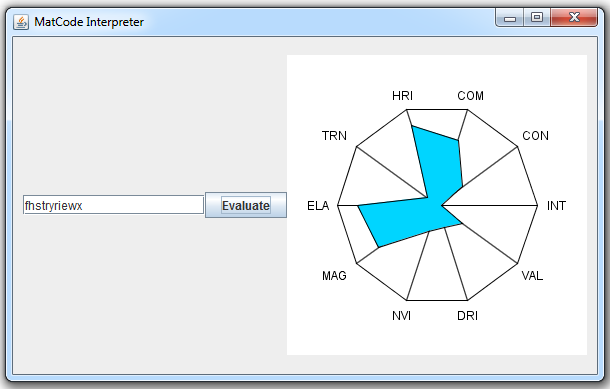
That, my reader(s), is my new MatCode Interpreter in action. Type in 11 characters, hit evaluate, and a new shape will be made for you. I admit, it has limited practical use as it doesn't supply exact values (it could, just doesn't), but it gives a good representation of approximate values. The color of the figure shows an interpretation of the material's "Workability Factor," a fancy name for cost modifier. The interpretation is that the darker/redder the color, the more expensive it is to work with. This random material apparently is very cheap to work with. The ten named values are (clockwise from right (3 o'clock)) integrity, conductivity, combustibility, heat resistance [index], transparency, elasticity, magnetism, nuclear value [index], decay resistance [index], and [intrinsic] value. Bear in mind that mid-range values are assumed to be average. In other words, the only places this material is above-average are magnetism, elasticity, heat resistance, and perhaps combustibility.
Above average isn't always better, though.
Anyway, this is my first actually vaguely complex Java program, and my first go with Java graphics aside from JFrames (basically, windows and buttons). I had made the text layout in photoshop, but I decided instead to render it using Java's graphics, in part to better acquaint myself with the system and in part because for a long time I was having trouble figuring out how to get the image into the program. I've since figured it out, but that was after setting Java up to do it.
So... what's my next step? I have no freaking clue. But I have plenty of other classes to work on. Some should be pretty easy, just the structural classes for my JDO database. Others are more involved, making frames and panels for managing different pieces. I have a lot of work to go, but I've made the first sizeable step.
Thursday, 25 February 2010
CRC Cards and How I Killed a Small Forest
Class, Responsibility, Collaborator. Those are the three things that go onto a CRC Card--the name of the class to be made, what that class does (including what data it stores), and which other classes this class interacts (or, as the name suggests, collaborates) with.
These cards are recommended as a tool for designing an object-oriented program. I do see the usefulness of them. That said, writing 41 CRC cards is not exactly the most entertaining way to pass time. And that includes a couple of cards that I finally decided to generalize, since some things like Ship, Vehicle, and Troop designs all actually contain the same thing and could, as a shortcut, be written on one card.
That said, I haven't gotten to programming yet but I've already seen a payoff from the cards in the form of an organizational hierarchy starting to form. I've got a list of seven classes that don't appear anywhere in the application, but will be great to add in as abstract parent classes. That is to say, I can make these classes with a set format but no data, and then make "child" or sub-classes that take that general structure and specialize it to their needs. It should also allow me to easily compare certain values.
As an example, a station could be built at any point of interest in a system, whether it's orbiting a planet, a moon, a star, or whatever else. Rather than having to store in the station's information both the name of the object it's stationed at and the type of object that is, by having all of these other objects (stars, planets, etc) as children classes to the overall Location parent class, I can simply have the station's location compared to anything that is a child of Location.
This will also work for fleets for current, and target, locations. As I said before, I haven't coded yet, so hopefully it'll work out half as well as I'm imagining it will, but it's nice to see things like this falling into place.
My plan, for the moment, is to develop the GUI class(es) next. I hope to have all of the GUI defined in one class, so that it can share a few easily-redefined variables, and then whenever I need a certain window I'll have the code handling that window call it from the list of already-created objects in the GUI. The intention is that when the user first starts the program, they'll be prompted with a login window where they enter their username and password, as well as being given either a list of display resolutions or a full-on configuration window (depending on how many things there actually are to configure). Personally, I'd like the application to run full-screen, but one of the options will most likely be a windowed mode. I did write up a little "Hello World!" fullscreen application, because I actually was doubtful that Java could even do that. It can, and therefore I intend to work with it.
When I say I'm developing the GUI, I mean the bare minimums. Rather than dealing with test programs for all of my stuff, I'd like to just plug in the code to the GUI I'm actually going to be using. Formatting of that GUI can come later, since as far as the code is concerned, the button can be gray with the word "Exit" on it or it can be a picture of an open door, it's still the same object.
I have a lot of time tomorrow so definitely expect some preliminary work on the GUI to be done for my next post. I might even post screenshots, not that they'll be pretty.
These cards are recommended as a tool for designing an object-oriented program. I do see the usefulness of them. That said, writing 41 CRC cards is not exactly the most entertaining way to pass time. And that includes a couple of cards that I finally decided to generalize, since some things like Ship, Vehicle, and Troop designs all actually contain the same thing and could, as a shortcut, be written on one card.
That said, I haven't gotten to programming yet but I've already seen a payoff from the cards in the form of an organizational hierarchy starting to form. I've got a list of seven classes that don't appear anywhere in the application, but will be great to add in as abstract parent classes. That is to say, I can make these classes with a set format but no data, and then make "child" or sub-classes that take that general structure and specialize it to their needs. It should also allow me to easily compare certain values.
As an example, a station could be built at any point of interest in a system, whether it's orbiting a planet, a moon, a star, or whatever else. Rather than having to store in the station's information both the name of the object it's stationed at and the type of object that is, by having all of these other objects (stars, planets, etc) as children classes to the overall Location parent class, I can simply have the station's location compared to anything that is a child of Location.
This will also work for fleets for current, and target, locations. As I said before, I haven't coded yet, so hopefully it'll work out half as well as I'm imagining it will, but it's nice to see things like this falling into place.
My plan, for the moment, is to develop the GUI class(es) next. I hope to have all of the GUI defined in one class, so that it can share a few easily-redefined variables, and then whenever I need a certain window I'll have the code handling that window call it from the list of already-created objects in the GUI. The intention is that when the user first starts the program, they'll be prompted with a login window where they enter their username and password, as well as being given either a list of display resolutions or a full-on configuration window (depending on how many things there actually are to configure). Personally, I'd like the application to run full-screen, but one of the options will most likely be a windowed mode. I did write up a little "Hello World!" fullscreen application, because I actually was doubtful that Java could even do that. It can, and therefore I intend to work with it.
When I say I'm developing the GUI, I mean the bare minimums. Rather than dealing with test programs for all of my stuff, I'd like to just plug in the code to the GUI I'm actually going to be using. Formatting of that GUI can come later, since as far as the code is concerned, the button can be gray with the word "Exit" on it or it can be a picture of an open door, it's still the same object.
I have a lot of time tomorrow so definitely expect some preliminary work on the GUI to be done for my next post. I might even post screenshots, not that they'll be pretty.
Wednesday, 24 February 2010
SQL Concurrency versus JDO, and why I want to make the switch
Small update tonight. I managed to not do much tonight except think. And think. And plan. The outcome is a decision to "scrap" what I have so far on the simulation and start new. Including, (most likely) the database.
And here I was promising the material decoder, huh? Not that it took very long to get nearly finished with that. Another couple of days and I'll probably have that finished, I just need to go through some organization first.
So what am I changing in starting new? Let's go into one of my standard bullet lists:
And here I was promising the material decoder, huh? Not that it took very long to get nearly finished with that. Another couple of days and I'll probably have that finished, I just need to go through some organization first.
So what am I changing in starting new? Let's go into one of my standard bullet lists:
- (Probably) Removing the SQL from my side of the coding by using Java Data Objects.
- Creating classes for the different objects (like planets and ships) rather than tables per se.
- Truly attempting to take advantage of the object-oriented nature of Java, a la Budd.
- Avoiding so-called "Concurrency" issues
- (Probably) Making the code easier on me to develop.
Java Data Objects, or JDO, are a method of storing entire Java Objects within a database. In my case, by creating a class for each in-game item, I can then store the classes in the database. This becomes useful in terms of the concurrency issues mentioned above. Concurrency in SQL is a problem where multiple users attempt to access the same data at the same time. When one person edits the data, the second person may well overwrite those changes even though the information they based it off of is no longer accurate. Generally this is handled by locking the row, so that only one person can access data at a time.
This is a major problem in my program because of the nature of the database I built, and how it would be accessed. The database is built with 'foreign keys,' or references to other tables, so that all of the data is interconnected. If one user is accessing all of the necessary data to run their empire, then a significant portion of the database is locked up while they're doing that work. Not a very user-friendly methodology. On the other hand, if the planets and ships and everything else are stored as independent objects, the user only accesses those that belong specifically to them and there aren't concerns about simultaneous edits.
I'm not too well-versed in the JDO things yet (I've just stumbled upon them today, really), so I'm not certain, but I do get the impression that using JDO means not needing to use SQL, and this simplifies my coding as well as removing the SQL altogether. Unfortunately, while I've found books that cover JDO, I can't find any at a library near me. I'm considering purchasing a copy somewhere off the web, but for now I'm going to try using the online documentation for it. Until I run into major issues, I'll probably stick with that.
My next couple of days are pretty slim in terms of time spent in-school, so hopefully I'll have a nice structure fleshed out and work started by... the weekend, at the latest? Wish me luck on that!
Tuesday, 23 February 2010
The Platypus: Object-Oriented Programming Primer
So, about that material decoder. Maybe tomorrow? I didn't have time for much coding today, but I have done some reading. Platty Pat apparently has been given the name Phyl by the author, but I like Platty Pat better so I'm sticking with it.
So what is Object-Oriented programming, anyway? According to this book (I need to give credit where it's due, so the book in question is: "Understanding Object-Oriented Programming with Java" by Timothy Budd. ISBN: 0-321-21174-X for my particular version), it's all about creating code in sections, called objects, which are essentially independent. Each object has its own responsibilities and its own way of accomplishing the tasks set out for it. In principle, there should be only a couple of interconnections between objects, and objects should be reusable from project to project without major restructuring. The program should also be separated such that major feature changes (graphical updates or saving to a different format or what-have-you) should only take updating one or two of the objects, as the other objects don't rely on what's in the other things, but what comes out of them.
I've been reading a bit about the class-oriented nature of Java, which, as I've said in the past, is the biggest part of what the book is about, and the biggest thing about Java I feel I need to understand more clearly. It's the reason there's a platypus on the cover of the book, because if you extend the class structure to real life, the platypus 'extends' the 'class' mammal but 'overrides' some 'methods,' primarily birthing. Anyway, basically a convenient metaphor that sums up a lot of the features of class-oriented programming.
Right now they're going through the design process behind it all, and it certainly is a lot different than what I've done so far--a kind of disappointing fact considering most of the books I've studied have been based around Java, so it would have been nice if it had started with Object-Oriented facets of the language. That said, given my as-yet limited experience with programming, it shouldn't be hard to switch to their methodology, which definitely seems like it would help.
It's interesting stuff and it's something I'm definitely going to take into consideration. Especially on account of the conversation I had today with a friend about my plans for the Simulation. He feels it'd be better for both sides if the administrator was cut out, to save time and all. I'm still intent on allowing complete customization though, which can't be done without the administrator. If I properly program this, I should be able to pretty easily try both. So I guess that's one of my new goals for the project. Keep in mind that one of my favorite things about PC games, and the reason I prefer them to console games a lot of times, is the fact that they can be modified. Mods can extend the life of a game quite astonishingly, and the customization is a key selling point to me. That's probably why I'm so set on making the simulation with the administrator-figure.
Also I managed to stumble upon Google Code, a resource for developers. Apparently a ton of Google's stuff is available for use by independent coders like myself. I might have a go at it sometime, but for now it's conveniently filed away that if I ever have a project that could take advantage of it, it's there to be used.
So what is Object-Oriented programming, anyway? According to this book (I need to give credit where it's due, so the book in question is: "Understanding Object-Oriented Programming with Java" by Timothy Budd. ISBN: 0-321-21174-X for my particular version), it's all about creating code in sections, called objects, which are essentially independent. Each object has its own responsibilities and its own way of accomplishing the tasks set out for it. In principle, there should be only a couple of interconnections between objects, and objects should be reusable from project to project without major restructuring. The program should also be separated such that major feature changes (graphical updates or saving to a different format or what-have-you) should only take updating one or two of the objects, as the other objects don't rely on what's in the other things, but what comes out of them.
I've been reading a bit about the class-oriented nature of Java, which, as I've said in the past, is the biggest part of what the book is about, and the biggest thing about Java I feel I need to understand more clearly. It's the reason there's a platypus on the cover of the book, because if you extend the class structure to real life, the platypus 'extends' the 'class' mammal but 'overrides' some 'methods,' primarily birthing. Anyway, basically a convenient metaphor that sums up a lot of the features of class-oriented programming.
Right now they're going through the design process behind it all, and it certainly is a lot different than what I've done so far--a kind of disappointing fact considering most of the books I've studied have been based around Java, so it would have been nice if it had started with Object-Oriented facets of the language. That said, given my as-yet limited experience with programming, it shouldn't be hard to switch to their methodology, which definitely seems like it would help.
It's interesting stuff and it's something I'm definitely going to take into consideration. Especially on account of the conversation I had today with a friend about my plans for the Simulation. He feels it'd be better for both sides if the administrator was cut out, to save time and all. I'm still intent on allowing complete customization though, which can't be done without the administrator. If I properly program this, I should be able to pretty easily try both. So I guess that's one of my new goals for the project. Keep in mind that one of my favorite things about PC games, and the reason I prefer them to console games a lot of times, is the fact that they can be modified. Mods can extend the life of a game quite astonishingly, and the customization is a key selling point to me. That's probably why I'm so set on making the simulation with the administrator-figure.
Also I managed to stumble upon Google Code, a resource for developers. Apparently a ton of Google's stuff is available for use by independent coders like myself. I might have a go at it sometime, but for now it's conveniently filed away that if I ever have a project that could take advantage of it, it's there to be used.
Subscribe to:
Posts (Atom)